Introduction
NIVIEM FSH-1 is a component-level digital emulation of the 1974 Maestro FSH-1 / Oberheim VCF-200 — the pioneering filter sample-and-hold pedal that gave seventies funk and progressive rock its bubbling, vocal, R2-D2-bleeping voice. Designed by Tom Oberheim as a contractor for Maestro and licensed simultaneously under his own Oberheim Electronics name, the FSH-1 became the first widely available filter modulation effect for guitar and the seed of every Oberheim synthesiser filter that followed it through the OB-8.
The plugin reproduces every block of the original schematic — the asymmetric integration capacitors of the state-variable filter, the LM741 triangle-wave LFO, the avalanche-noise sample/hold circuit, the per-OTA tanh saturation — and extends the toolkit with an envelope-follower mode (Mu-Tron III territory), a Leslie 122 rotating-cabinet stage, and modern production-grade amenities (host tempo sync, full preset system, built-in encyclopedia, click-free transitions on every parameter change).
What Makes This Plugin Special
- Authentic state-variable filter: TPT-discretised SVF with asymmetric integration capacitors modelling the original C3 = 1 nF / C5 = 30 nF pair (the 30:1 ratio that defines the FSH-1's gentle phase taper at high Q) and frequency-dependent Q reduction matching the natural bandwidth limit of the CA3080 OTAs above 1 kHz
- Two CA3080 saturation models: Authentic runs a per-integrator Newton-Raphson nonlinear ZDF — both OTAs saturate independently with feedback through the resonance loop, harmonically richer at high resonance, schematic-faithful. Smooth lumps the multi-stage hardware nonlinearity into a single tanh at the SVF input over a 2× internal halfband upsampler with a linear closed-form ZDF — gentler on hot signals, lighter CPU, vintage-warm character.
- Three operating modes: Filter (LFO-swept cutoff — the canonical auto-wah voice), Sample/Hold (avalanche-noise stepped voltages held until the next clock — the iconic FSH-1 "bubble"), and Envelope (Mu-Tron III-style auto-wah driven by input dynamics — a Niviem creative addition not on the original 1974 hardware).
- Five filter types: Lowpass (authentic, the only output the original hardware exposed), Bandpass, Highpass, Notch, Peak — the four modern additions are step-crossfaded so type changes are click-free even mid-playback.
- Five LFO waveforms in Filter mode: Triangle (authentic 1974 voice from the LM741 integrator), Sine, Square, Sawtooth, Random — the latter four are Niviem creative additions.
- Avalanche-noise Sample/Hold: Box-Muller Gaussian PRNG models the heavy-tailed amplitude distribution of the original 2N3904 in reverse-bias avalanche breakdown, sampled and held by a JFET-modelled gate — every plugin instance carries its own seeded XORshift state for true uncorrelated stereo.
- Mu-Tron-faithful Envelope mode: Sensitivity (1×–12×, the Mu-Tron III "Drive" control) and Attack (0.5–50 ms, exposed as a continuous knob — boutique convention) drive a peak-detector envelope follower that pushes the cutoff upward from the Range setting. Speed becomes the release-time control with the readout switching to milliseconds automatically.
- Leslie 122 cabinet emulation: Direct (bypass — bit-identical to the bare pedal output), Rotating Subtle (bandpass pre-emphasis + 35 % AM tremolo), Rotating Full (bandpass + 65 % AM + dynamic two-pole low-pass + Doppler horn pitch wobble). All three engage and disengage through a 20 ms equal-power crossfade so cabinet toggles never click.
- Continuous 2-mic stereo placement: Mics chip selects Single (mono modulation) or Stereo (virtual mic pair); the Stereo geometry is then dialled in with Spread (0–180°, angular separation) and Angle (0–360°, pair rotation around the rotor axis with wrap-aware smoothing).
- Quality oversampling: Four user-selectable depths (Off, Eco 2×, Standard 4×, High 8×) with click-free dual-path crossfade — every Quality switch routes through a Phase 1 latency-pad warm-up plus a Phase 2 equal-power blend, so changing oversampling depth mid-playback is sample-aligned and silent.
- Host tempo sync: 7 note divisions (1/16 up to 4 Bars) for Filter and Sample/Hold mode LFOs.
- 41 factory presets: Six categories — Filter Mode (13), Sample/Hold (6), Envelope (8), Tempo Sync (4), Cabinet (6), Smooth Tone (4) — calibrated for level consistency across the bank (≤ 3 dB peak-to-peak at -12 dBFS reference).
- Nivipedia: 60-entry built-in encyclopedia covering every control, mode, filter type, theoretical background and historical reference — searchable, hyperlinked, accessible from a "What is this?" item on every right-click context menu.
- Zero-compromise transitions: 25 ms equal-power bypass crossfade, 25 ms OTA-Model crossfade, 20 ms cabinet engagement crossfade, single-block step crossfades on Mode / Filter Type / LFO Waveform changes — every parameter change that would otherwise click is bridged by a sample-aligned blend.
- Premium WebView UI: Brushed-metal chassis with engraved silkscreen labels, photoreal milled-aluminium knobs, real-time envelope LED, value readouts on every control, gesture-aware host-automation bracketing on every drag, full keyboard navigation, ARIA scaffolding for screen-reader users.
Who Is This Plugin For?
The FSH-1 is at home anywhere movement, vocal coloration, or stepped randomness matters — from seventies funk through modern electronic production. Filter and Sample/Hold modes work beautifully on guitars, keyboards, and full mixes; Envelope mode opens the door to modern auto-wah and bass-pluck reactivity; the Cabinet stage adds authentic Leslie 122 character to any voice the rest of the plugin shapes.
| Application | Why FSH-1 |
|---|---|
| Funk & R&B Guitar | The canonical 1970s clavinet / rhythm-guitar auto-wah voice that defined the genre. Filter mode + Lowpass + Q 3–4.5 + Range 700–800 Hz gives you Eddie Hazel and Larry Graham territory immediately. |
| Progressive Rock | Slow LP sweeps under sustained leads (Zappa "Black Napkins" territory) and S/H bubbles for synth doubles. Both modes are stage-rack regulars from the 1970s tour circuit. |
| Bass | Filter mode at 200 Hz Range with parallel Mix preserves the fundamental while adding movement. Envelope mode + 0.8 ms attack reacts pluck-by-pluck for funk bass. |
| Sound Design | Sample/Hold + high resonance + 4–6 Hz speed for the iconic 1970s sci-fi computer-bleep textures. Envelope mode + bandpass + 0.5 ms attack for percussive accent design. |
| Electronic Production | Tempo-synced S/H for rhythmic accents; Filter mode + Sawtooth waveform + bandpass for DnB wobble bass; tempo-synced 16th note S/H for vocal chops. |
| Drums & Percussion | Envelope mode + bandpass + 0.5 ms attack as a transient-reactive filter on drum loops and percussion buses. The filter dips on every transient. |
| Hammond & Organ | Cabinet = Rotating Full + Filter mode adds authentic Leslie 122 character on top of FSH-1 filter motion. The horn-rotation Doppler is modelled, not synthesised. |
| Mix Bus & Stems | Subtle Cabinet + low-depth Filter sweep adds gentle stereo width and analog motion without obvious phasing. Useful at 30–50 % Mix on a parallel send. |
| Cinematic & Ambient | Slow 0.1 Hz sweeps, S/H with droop, parallel Mix at 30–50 %, Smooth OTA model for evolving low-key texture beds. |
| Live Performance | Click-free Quality switching and bypass let you change settings during playback without artefacts. The internal step crossfades make the plugin tour-rated, not just studio-rated. |
The Original: Maestro FSH-1 / Oberheim VCF-200
Tom Oberheim
Tom Oberheim was a freelance engineer in Los Angeles in 1969-70, building ring modulators and phase shifters for Maestro (the effects brand owned by Norlin Corporation, parent of Gibson at the time) and other manufacturers. Out of that contract work came the FSH-1, which Oberheim simultaneously licensed under his own name as the Oberheim Electronics VCF-200 — the first product of what would become one of the defining American synthesiser companies of the 1970s and 1980s.
The FSH-1's filter section was the seed of every Oberheim synthesiser filter that followed it. The state-variable topology with non-self-oscillating Q is the signature Oberheim sound, immediately recognisable in the SEM, the Two-Voice and Four-Voice polysynths, the OB-X / OB-Xa / OB-8 family, and the 12-voice OB-12. If you like the FSH-1's filter character you'll like every Oberheim synth filter through the mid-eighties — they are all the same family.
What Came After
| Year | Oberheim Product |
|---|---|
| 1974 | Oberheim Synthesizer Expander Module (SEM) — a complete monosynth voice in a box, modular building block |
| 1975 | Oberheim Two-Voice and Four-Voice — analog polysynths built from SEMs |
| 1979 | OB-X polysynth — the first of the OB-series that defined eighties film and rock |
| 1980 | OB-Xa — Curtis-IC redesign that became the trademark Oberheim sound (Van Halen's Jump, Prince's signature) |
| 1980 | DMX drum machine — eight individual outs, foundational eighties rhythm box (New Order's Blue Monday) |
| 1983 | OB-8 — the OB-Xa successor, polysynth flagship through the mid-eighties |
The Pedal
The Maestro FSH-1 was introduced in 1974 by Maestro / Norlin. The exact same circuit was sold by Oberheim Electronics under the VCF-200 name with different chassis and graphics. Both pedals share the schematic — the only difference is branding.
The front panel exposed:
- Speed (LFO rate, 0.05–15 Hz)
- Range (filter centre frequency, 80 Hz–3 kHz)
- Resonance (Q factor, 0.5–10)
- Filter / Sample-Hold mode switch
- Bypass footswitch with status LED
The original was monophonic, lowpass-only, and ran from a 9 V battery (regulated to ±8 V on the rails). Two CA3080 OTAs handled the filter integration; an LM741 op-amp generated the triangle LFO; a second LM741 buffered the sample/hold circuit; a 2N3904 NPN transistor in reverse-bias avalanche breakdown produced the noise; two 2N4303 JFETs sampled the noise into a hold capacitor.
Original Hardware Specifications
| Component | Value |
|---|---|
| Manufacturer | Maestro (Norlin) / Oberheim Electronics |
| Designer | Tom Oberheim |
| Year | 1974 |
| Filter Topology | State-variable, 12 dB/octave, non-self-oscillating |
| Filter Integrators | 2× RCA CA3080 OTAs (IC1 bandpass, IC2 lowpass) |
| Integration Capacitors | C3 = 1 nF, C5 = 30 nF (asymmetric 30:1 ratio) |
| LFO | LM741 op-amp triangle generator |
| LFO Timing | C6 = 4.7 µF, R28 = 2 MΩ pot (= 0.05–15 Hz range) |
| S/H Buffer | LM741 op-amp |
| Noise Source | 2N3904 NPN in reverse-bias avalanche breakdown |
| S/H Switches | 2× 2N4303 JFETs (input gate + output gate) |
| Filter Output | Lowpass only |
| Modes | Filter / Sample-Hold (2-position switch) |
| Power | ±9 V battery, regulated to ±8 V |
The Niviem plugin starts from the General Guitar Gadgets schematic of the Maestro FSH-1 (JD Sleep, 2015) and models every component value at the DSP level — no broad-strokes emulation, no "sounds about right" approximation. The 30:1 capacitor ratio between the two integration capacitors, the 19.2× transconductance constant of the CA3080, the avalanche-distribution kurtosis of the 2N3904 noise transistor: all transferred to code.
Notable Users
Frank Zappa & The FSH-1
The canonical reference. Frank Zappa picked up an Oberheim VCF-200 (the FSH-1 under its Oberheim badge) in the early seventies and added it to his guitar chain. The Sample/Hold mode in particular shows up across his electric work of the period — the bubbling, computerised filter motion underneath sustained guitar lines.
| Recording | Role |
|---|---|
| Zoot Allures (1976) — "Black Napkins" | A February 1976 Osaka live take, edited for studio release. The canonical Zappa-with-FSH-1 reference; the title track also carries Filter-mode sweeps under the lead. |
| Shut Up 'n Play Yer Guitar Some More (1981) — "Ship Ahoy" | Recorded live in Osaka 1976-02-03 and held back for the 1981 instrumental compilation. The iconic Sample/Hold percolation cut — the bubbling, percussive S/H character heard under sustained legato runs. |
| Various live tapes 1976-78 tours | The VCF-200 was a stage-rack regular on the road through the mid-seventies. |
The conventional wisdom passed down by his guitar techs is that Zappa kept the VCF-200 set fairly fast in S/H mode — somewhere around 4-6 Hz — with high resonance and a low Range. That gives the bubbling, percussive character heard under his sustained legato runs. In Filter mode his settings tended toward slower, deeper sweeps with moderate Q. The factory Random Bleeps preset is calibrated to that high-resonance Sample/Hold territory.
Other Users
- Jerry Garcia (Grateful Dead) — used the VCF-200 in studio work for psychedelic textures
- 1970s progressive-rock keyboard rigs — the Sample/Hold mode became a stock effect for synthesiser leads through the seventies tour circuit
- Hammond / Leslie players — the FSH-1 in Filter mode through a Leslie 122 became a recognisable B3-organ-with-extra-motion sound, particularly on prog and jazz-fusion records of the era; the plugin's Cabinet stage models that pairing directly
Modern Resurgence
Original Maestro FSH-1 and Oberheim VCF-200 units in working condition trade at high prices on the vintage market — the unique FSH-1 voice is hard to substitute and the original hardware is fifty years old. The plugin gives you the sound without hunting down a 50-year-old box of capacitors.
Authenticity & Emulation Approach
Our Methodology
NIVIEM FSH-1 was developed using rigorous methodology rooted in the original schematic, not in published recordings or aftermarket clones:
- Primary Source Schematic — General Guitar Gadgets transcription of the Maestro FSH-1 (JD Sleep, 2015), cross-referenced against builder-community traces of the Oberheim VCF-200
- Component-Level DSP — every active and passive component on the schematic has a corresponding DSP block: the two CA3080 OTAs, the three LM741 op-amps, the 2N3904 avalanche-noise transistor, the 2N4303 sample/hold JFETs, the asymmetric integration capacitor pair (C3 = 1 nF, C5 = 30 nF), the LFO timing pair (C6 = 4.7 µF, R28 = 2 MΩ)
- Datasheet-Derived Constants — RCA CA3080 datasheet values for transconductance (19.2× temperature constant), input differential-pair non-linearity threshold (±2 · Vt ≈ 52 mV at room temperature), and bandwidth roll-off above 1 kHz
- Behavioural Verification — each DSP block tested against the schematic-predicted behaviour: filter Q vs frequency curves, OTA saturation knee at line-level signals via the R4/R5 schematic divider, S/H Gaussian distribution kurtosis matched to the 2N3904 in reverse-bias breakdown
- Listening Verification — every factory preset auditioned against the canonical published recordings of the original hardware (Zappa's Zoot Allures and Shut Up 'n Play Yer Guitar Some More, period progressive-rock keyboard recordings) before shipping
Key DSP Implementations
| Component | Implementation |
|---|---|
| State-Variable Filter | TPT (Topology-Preserving Transform) discretisation per Vadim Zavalishin, The Art of VA Filter Design. Asymmetric integration capacitors modelled as g1 = g · √30, g2 = g / √30 in the integrator update — preserves the original 30:1 capacitor ratio in the digital domain |
| CA3080 Saturation | Two switchable models. Authentic = per-integrator Newton-Raphson nonlinear ZDF, both OTAs saturate independently with feedback through the resonance loop, schematic-faithful R4/R5 input divider mapping line-level signals to the 1.6 V plugin-domain knee. Smooth = single tanh at the SVF input over a 2× internal halfband upsampler with linear closed-form ZDF, lighter CPU and gentler high-Q response. |
| Frequency-Dependent Q | Q reduction curve above 1 kHz that holds at ~60 % of requested Q above 4 kHz, modelling the natural OTA bandwidth limit. Per-sample, no audible discontinuity at the curve transition. |
| Coefficient Caching | 1 Hz JND threshold on the cutoff coefficient recompute — cuts tan() calls by ~95 % on smooth LFO sweeps. Same caching strategy FabFilter Pro-Q uses; ear cannot detect a 1 Hz step on a 200 Hz–3 kHz sweep. |
| LFO | Triangle generator matched to the LM741 integrator output, four Niviem creative additions (Sine, Square, Sawtooth, Random). Per-instance seeded XORshift32 PRNG via memory-address + steady_clock entropy — every plugin instance produces uncorrelated random output. |
| Avalanche-Noise S/H | Box-Muller Gaussian PRNG models the heavy-tailed amplitude distribution of the 2N3904 in reverse-bias breakdown. Sampled into a hold capacitor at the LFO clock edge with optional droop emulation (capacitor leakage) and slew-rate limiting matching the JFET switching behaviour. |
| Envelope Follower | Mu-Tron III faithful: peak detector → tanh saturation (the OTA's own input non-linearity) → sqrt perceptual mapping. Sensitivity drives the pre-gain (1×–12×, the Mu-Tron "Drive at twelve o'clock" default lands at 6×); Attack is exposed as a continuous knob (0.5–50 ms), the boutique-pedal convention rather than the Mu-Tron Fast/Slow switch. |
| Cabinet (Leslie 122) | Four-stage chain ported from the Klang 8008 ROVER post-processor. Bandpass pre-emphasis (peaking EQ at 1.5 kHz, +2 dB Q 1.5), amplitude tremolo (Subtle 35 % / Full 65 %), dynamic low-pass (Subtle one-pole 5 kHz min / Full two-pole 1.5 kHz min, both sweep up to 20 kHz with rotor phase), Doppler delay line (Full only — 1.0 ms base + ±0.44 ms modulation depth, simulating a ~30 cm horn radius rotating at 6.8 Hz). |
| 2-Mic Geometry | The mic pair is rotated around the rotor axis by Angle and separated by Spread (half each side of L). Both modifiers are gated by an engagement smoother so the OFF→ON toggle ramps cleanly. Wrap-aware angle smoothing crosses the 0/360 boundary the short way. |
| Quality Oversampling | Four pre-allocated FIR halfband-cascade paths (1×, 2×, 4×, 8×). Lock-free atomic dispatch via activePathIndex_. Quality switches route through a two-phase crossfade — Phase 1 fills the pending path's latency pad with current audio while the listener still hears 100 % active, Phase 2 then runs an equal-power blend across one host block. Total switch is sample-aligned and silent. |
| State Migration | Every DSP component (FSH1Filter, RotaryCabinet) implements copyStateFrom(other) so the integrator state, LFO phase, doppler buffer, BP / LP histories and AM smoothers all migrate across Quality changes — the new path starts the crossfade in the same DSP state the old one was in, only at a different internal sample rate. |
| Bypass Crossfade | 25 ms equal-power blend on bypassMix_. The internal filter's bypass short-circuit is forced off during the crossfade so the blend has a real wet output to fade from / to; once the smoother settles at zero a top-of-block early-return skips ALL DSP. |
What We Added Beyond the Original
While maintaining absolute fidelity to the 1974 schematic for the canonical Filter and Sample/Hold modes, NIVIEM FSH-1 includes modern enhancements that extend the toolkit without compromising the authentic voice:
- Envelope mode — a Niviem creative addition driven by an input-amplitude peak detector. Mu-Tron III auto-wah territory; not on the original 1974 hardware (which had no envelope follower at all).
- Five filter types — the original had Lowpass only. Bandpass, Highpass, Notch and Peak are step-crossfaded modern additions.
- Five LFO waveforms — the original was Triangle only. Sine, Square, Sawtooth and Random are Niviem creative options for users who want a different motion under the same Range / Speed / Depth controls.
- OTA Model selector — Authentic vs Smooth lets the user choose between the schematic-faithful per-integrator solve and a lighter-CPU vintage-warm voicing.
- Cabinet stage — Direct (bypass, bit-identical to the bare pedal) plus two Leslie 122 emulations (Subtle and Full) with continuous 2-mic stereo placement.
- Quality oversampling — four levels of FIR halfband oversampling with click-free dual-path crossfade between any two depths during playback.
- Host tempo sync — there was no DAW in 1974. Filter and S/H mode LFOs can lock to host BPM at note divisions from 1/16 up to 4 Bars.
- Wet/dry Mix — the hardware was always full-wet. Mix exposes the standard premium-plugin crossfade with an equal-power 50 % default for unity perceived loudness on a fresh instance.
- Output trim — square-law-mapped post-mix gain, transparent at the unity default, up to ~+12 dB makeup at maximum. The original had no output stage and the plugin defaults to bit-identical unity.
- Real-time-safe transitions everywhere — every parameter change that could click is bridged by a sample-aligned blend: bypass, mode, filter type, LFO waveform, OTA model, cabinet engagement, Quality change. The plugin is tour-rated for live-rig use, not just studio playback.
What We Did NOT Add
We made deliberate decisions to leave certain hardware quirks and Niviem-temptation features OUT of the plugin, in service of authenticity and predictable behaviour:
- Self-oscillation — the original SVF does not self-oscillate at maximum Q. Neither does the plugin. Moog-ladder-style self-oscillation would require breaking the topology and we kept the schematic.
- Non-deterministic component drift — every plugin instance produces identical output for identical inputs at identical settings. Component-tolerance modelling (per-instance random ±5 % integrator caps, etc.) is reserved for a future "Vintage" feature pass.
- Bass-drum Leslie rotation — the original Leslie 122 has a separately rotating bass drum (15-inch speaker, ~0.8 Hz / 6.8 Hz). The current Cabinet stage models only the treble horn rotation; on guitar / instrument-range material the horn does the audible work. Bass-drum rotation is on the v1.1 roadmap.
- Spaced-mic comb filtering — 2-Mic Stereo simulates two virtual mics at user-controlled angular positions around the rotor. The microphone-spacing comb filter that occurs with two physical mics at slightly different distances from the source is not modelled; the plugin's stereo image is rotational rather than positional.
Installation
System Requirements
| Platform | Requirements |
|---|---|
| macOS | 11.0 (Big Sur) or later, Intel or Apple Silicon |
| Windows | Windows 10/11 (64-bit), SSE2-compatible CPU |
- Formats: Audio Unit (AU — macOS only), VST3 (macOS & Windows), Standalone (debug builds only)
- DAW: Logic Pro, GarageBand, Ableton Live, Cubase, Studio One, Reaper, Bitwig, Pro Tools, or any AU/VST3 host
- RAM: 4 GB minimum, 8 GB recommended
- Disk Space: ~50 MB
- Sample Rates: 44.1 kHz – 192 kHz (host-driven)
macOS Installation
- Download the NIVIEM FSH-1 installer (
.pkg) - Run the installer and follow the on-screen instructions
- The plugin will be installed to:
- AU:
~/Library/Audio/Plug-Ins/Components/Niviem Filter SH.component - VST3:
~/Library/Audio/Plug-Ins/VST3/Niviem Filter SH.vst3
- AU:
- Restart your DAW
- Scan for new plugins if your host requires it (Logic auto-validates AUs on launch)
Manual installation:
- Copy
Niviem Filter SH.componentto~/Library/Audio/Plug-Ins/Components/ - Copy
Niviem Filter SH.vst3to~/Library/Audio/Plug-Ins/VST3/ - Restart your DAW
Gatekeeper note: the plugin is code-signed and notarised by Apple. If macOS still blocks the plugin on first launch, go to System Settings → Privacy & Security and click "Open Anyway" next to the FSH-1 entry.
Windows Installation
- Download the NIVIEM FSH-1 installer (
.exe) - Run the installer as Administrator
- The plugin will be installed to:
- VST3:
C:\Program Files\Common Files\VST3\Niviem Filter SH.vst3
- VST3:
- Restart your DAW
- Scan for new plugins if required
WebView2 note: the plugin's UI is rendered through Microsoft Edge WebView2. On Windows 11 the runtime is pre-installed; on Windows 10 you may be prompted to install it. Download from https://developer.microsoft.com/en-us/microsoft-edge/webview2/ and install before relaunching the host.
License Activation
- On first launch, the plugin opens the activation dialog over the chassis. The chassis itself is dimmed and a "DEMO" badge sits in the header until activation completes.
- Enter your license key (received after purchase from the Niviem dashboard)
- Click Activate
- If you choose Continue as Demo, the plugin is fully functional but the audio output fades to silence for 5 s every 60 s of playback (with a 10 ms equal-power fade at every play↔mute boundary, so the demo cycle never clicks)
- You can activate at any time by clicking the ACTIVATE button in the header — the dialog re-opens over the chassis and accepts your key
Network requirements: license activation contacts the Niviem dashboard once; thereafter the plugin verifies the JWT against an embedded public key with no network access required. Offline use after activation is fully supported.
Getting Started
Quick Start (90 seconds)
- Insert NIVIEM FSH-1 on a guitar, bass, synth or full-mix track
- The plugin loads with the Default state — Filter mode, Lowpass, 500 Hz Range, 0.707 Q, 1 Hz Speed, 50 % Mix, Direct cabinet, Authentic OTA
- Press play. You hear a gentle Lowpass sweep at 1 Hz around 500 Hz — the canonical FSH-1 idle voice.
- Try these controls in order:
- Speed: turn up to 2 Hz for a tighter wah pocket
- Range: slide between 200 Hz (bass territory) and 1.5 kHz (vocal-wah territory)
- Resonance: dial Q from 0.7 (warm, smooth) up to 5 (vocal, peaky) up to 10 (aggressive, near-resonant)
- Mode pill: flip from Filter to Sample/Hold for stepped random voltages, then to Envelope to drive the cutoff from your input dynamics
- Mix: pull down to 30 % for parallel processing, push up to 100 % for the original FSH-1 voice
- Click the Preset name in the header to open the preset browser. Try Classic Auto-Wah, then Random Bleeps, then Mu-Tron Classic to hear the three modes back-to-back.
Signal Flow
                              ┌────────────────────┐
                              │   Modulation       │
                              │   ─────────────    │
                              │   • LFO (Filter)   │
                              │   • S/H (Avalanche)│
                              │   • Env follower   │
                              └─────────┬──────────┘
                                        │
                                        ▼  cutoff modulation
┌────────┐   ┌──────────┐   ┌───────────────────┐   ┌──────────┐   ┌──────────────┐   ┌───────────┐
│  IN    │──►│ Bypass + │──►│ Oberheim SVF      │──►│ Wet/Dry  │──►│ Cabinet      │──►│ Output    │──► OUT
│        │   │ DC block │   │ (CA3080 OTA model)│   │ Mix      │   │ (Leslie 122) │   │ trim + DC │
└────────┘   └──────────┘   └───────────────────┘   └─────┬────┘   └──────┬───────┘   └───────────┘
                                                          ▲                ▲
                                                          │                │
                                                       Dry tap        Direct / Subtle / Full
| Stage | What happens |
|---|---|
| Bypass + DC | Plugin-wide bypass with 25 ms equal-power crossfade. 10 Hz one-pole DC blocker removes any DC offset the upstream chain may carry in. |
| Oberheim SVF | The asymmetric-capacitor state-variable filter. CA3080 OTA saturation runs per OTA Model: Authentic = per-integrator Newton-Raphson NL-ZDF, Smooth = single-stage tanh + linear ZDF. The whole filter is wrapped in the user-selected Quality oversampler (1×–8×). |
| Modulation | One of three modulation sources drives the cutoff: Filter mode's LFO (Triangle / Sine / Square / Sawtooth / Random), Sample/Hold mode's avalanche-noise PRNG sampled at the LFO clock, or Envelope mode's input-amplitude peak detector + sqrt mapping. |
| Wet/Dry Mix | Equal-power crossfade between the unprocessed input (dry) and the filter output (wet). Default 50 % gives unity perceived loudness; 100 % matches the original FSH-1 hardware voice. |
| Cabinet | Optional Leslie 122 stage. Direct = bit-identical bypass. Rotating Subtle / Full add bandpass pre-emphasis, AM tremolo, dynamic low-pass and (Full only) Doppler horn pitch wobble. 2-Mic Stereo dials in continuous Spread + Angle on the virtual mic pair. |
| Output | Square-law-mapped trim (50 = unity / 0 dB, 100 = +12 dB). Bit-identical to a no-output build at the unity default. Output DC blocker after the trim cleans residual offsets from the Cabinet's AM stage. |
The internal sample rate inside the SVF is the host rate × the Quality oversampling factor; the Cabinet runs at host rate (post-downsample); the Output trim and final DC blocker also run at host rate. The reported plugin latency is fixed at the deepest oversampler's FIR group delay so a Quality change during playback is sample-aligned and silent.
First Preset Tour
The factory bank is the fastest way to hear what the plugin can do. Click the preset name in the header, then walk through these in order:
| Preset | Category | What You'll Hear |
|---|---|---|
| Classic Auto-Wah | Filter | The canonical 1974 voice — clavinet / rhythm guitar territory |
| Random Bleeps | Sample/Hold | The Frank Zappa S/H — sustained synth lines turn into computer chatter |
| Mu-Tron Classic | Envelope | Mu-Tron III auto-wah — gentle, breathing, input-dynamics-driven |
| Slow Leslie Chorale | Cabinet | Classic slow Leslie rotation — chorale character on top of an LP filter sweep |
| Vintage Smooth Wah | Smooth Tone | The classic LP wah voiced through the Smooth OTA model — softer top-end character on hot input levels |
| Quarter Note Sweep | Tempo Sync | Filter LP locked to host quarter notes — sits in the groove without manual tempo tweaking |
After the tour, Default (or right-click the preset name → Reset) returns you to a clean starting state.
User Interface Overview
The FSH-1 chassis is designed to read as a piece of premium 1970s outboard gear: a brushed-metal slab with engraved silkscreen, photoreal milled-aluminium knobs, recessed LCD-pillbox value readouts, and a single illuminated power button. Every interactive surface carries WAI-ARIA scaffolding so the plugin is operable from a screen-reader or keyboard-only workflow as well as the mouse.
Layout
┌───────────────────────────────────────────────────────────────────────┐
│  NIVIEM   FILTER SAMPLE/HOLD            [NIVI] [Preset ▼] [<>] [+] [⏻]  │
├───────────────────────────────────────────────────────────────────────┤
│                                                                         │
│   ┌─────────────────────────────────┐                                  │
│   │  [ Filter ] [ Envelope ] [ S/H ]│   ← Mode pill (radiogroup)       │
│   └─────────────────────────────────┘                                  │
│                                                                         │
│   ╭─────────╮ ╭──────╮ ╭──────╮ ╭──────╮ ╭──────╮ ╭──────╮ ╭──────╮ ╭──────╮ │
│   │  RANGE  │ │ DEPTH│ │ SPEED│ │  RES │ │ SENSE│ │ATTACK│ │  MIX │ │OUTPUT│ │
│   │  ⊙      │ │  ⊙   │ │  ⊙   │ │  ⊙   │ │  ⊙   │ │  ⊙   │ │  ⊙   │ │  ⊙   │ │
│   │ 500 Hz  │ │2.0 oct│ │1.0 Hz│ │ Q 0.7│ │ 6.0x │ │1.5 ms│ │  50% │ │0.0 dB│ │
│   ╰─────────╯ ╰──────╯ ╰──────╯ ╰──────╯ ╰──────╯ ╰──────╯ ╰──────╯ ╰──────╯ │
│                                                                         │
│   [Type LP] [Wave Tri] [Sync Free] [Quality Std]                       │
│   [Cabinet Direct] [OTA Auth]                                          │
│                                                                         │
│            ─── ENVELOPE LED ────  RATE                                  │
│                                                                         │
└───────────────────────────────────────────────────────────────────────┘
(The actual rendered chassis is a continuous brushed-metal face with engraved labels, milled-knob assemblies and recessed value readouts; the diagram above shows the logical grouping.)
Header Bar
| Element | Function |
|---|---|
| NIVIEM | Brand mark — non-interactive |
| FILTER SAMPLE/HOLD | Product type label — non-interactive |
| NIVI | Opens Nivipedia (built-in encyclopedia, full-screen overlay) |
| Preset name | Click to open the preset browser. Categories collapse / expand; each preset shows a name + tagline |
| < > | Previous / Next preset navigation. Wraps at the ends of the bank. |
| + (SAVE) | Save the current settings as a user preset. Opens the Save dialog with name / category / description fields. |
| DEMO / ACTIVATED | License state badge. DEMO = unlicensed (audio fades to silence 5 s every 60 s). ACTIVATED = licensed. |
| ACTIVATE | (Demo state only) Opens the activation modal. Accepts a key copied from the Niviem dashboard. |
| ⏻ (Power) | Bypass toggle. Lit teal = effect engaged. Dim = bypassed (signal passes through unchanged after a 25 ms crossfade). |
Main Chassis — Knob Row
Eight rotary knobs, each with an engraved silkscreen label above and an LCD-pillbox value readout below. Knob layout from left to right:
| Knob | Mode-Conditional |
|---|---|
| Range | Always active. Filter centre frequency. |
| Depth | Always active. Modulation octave width. |
| Speed | Always active. Function changes by mode (LFO rate / clock rate / release time). |
| Resonance | Always active. Filter Q. |
| Sense | Active in Envelope mode only. Greys out in Filter / Sample-Hold. |
| Attack | Active in Envelope mode only. Greys out in Filter / Sample-Hold. |
| Mix | Always active. Wet/dry crossfade. |
| Output | Always active. Post-mix trim. |
Footer Strip — Chips
Six small pill-shaped chips below the knob row, organised into two visual clusters:
Filter cluster (Filter mode parameters):
- Type — Lowpass / Bandpass / Highpass / Notch / Peak
- Wave — LFO Waveform (Triangle / Sine / Square / Sawtooth / Random)
- Sync — Tempo Sync division
Output cluster (output-stage parameters):
- Quality — Oversampling depth (Off / Eco / Std / High)
- Cabinet — Output stage selector (Direct / Rotating + sub-controls)
- OTA — CA3080 saturation model (Authentic / Smooth)
Each chip lights teal when its value is non-default — a quick visual scan tells you which controls have been moved off the authentic 1974 baseline.
Value Readouts
Every rotary knob has a recessed LCD-pillbox readout below it that shows the current value in human-readable units (Hz, octaves, ×, ms, %, dB, Q). The readout updates live during a drag and during DAW automation. Holding the cursor on a knob for more than 500 ms reveals a hover tooltip with the parameter name, current formatted value, and full range — same information presented in a different position so the eye doesn't have to leave the knob to read the readout.
Interaction Patterns
| Gesture | Effect |
|---|---|
| Click + drag | Adjust knob value (vertical drag). The cursor switches to a grabbing icon during the drag. |
| Mouse wheel | Fine-grained value adjustment. Hold ⇧ Shift for coarse step, ⌥ Option for fine step. |
| Double-click | Open numeric value entry. Type a value, press Enter to commit, Esc to cancel. |
| ⌘ Click / Ctrl Click | Reset to default. |
| Right-click | Open context menu (Reset / Copy / Paste / What is this?). |
| Tab | Move keyboard focus to the next knob / chip. Each knob is a focusable WAI-ARIA slider. |
| Arrow keys (focused knob) | Step the value. Hold ⇧ Shift for coarse, ⌥ Option for fine. |
| Home / End (focused knob) | Jump to minimum / maximum. |
| Esc | Close any open modal (preset browser, Nivipedia, Save dialog, value-input). |
Right-Click Context Menu
Every interactive control (knob, chip, mode pill, bypass button) exposes a right-click menu with four entries:
| Menu Item | Behaviour |
|---|---|
| Reset to Default | Restores the parameter to its factory default value via the gesture-wrapped automation pipe (single recorded edit, not a smear). |
| Copy Value | Copies the current human-readable value (e.g. "500 Hz", "Q 4.5", "Standard") to the system clipboard. |
| Paste Value | Parses the clipboard and writes the value if it matches the parameter's expected format. Numeric and named values both supported. |
| What is this? | Opens Nivipedia at the entry that describes this control. Mode-aware — clicking on the Mode pill in Envelope state opens the Envelope mode entry. |
Visual Feedback
The chassis surfaces several real-time visualisations:
- Mode pill highlight: the active mode reads as a luminous teal pill; inactive modes sit dim.
- Chip "active" glow: chips lit teal when off the default value, dim when at default. Quick scan = which controls are in non-authentic positions.
- Knob "active" ring: an active drag, wheel scrub or value-input session paints a thin teal ring around the knob and brightens the readout.
- Rate LED (between Speed and Mix): pulses teal at the LFO frequency in Filter / Sample-Hold modes; flashes on every input transient that crosses the rising-edge threshold in Envelope mode.
- Speed knob lock: when Tempo Sync is engaged in Filter / Sample-Hold modes, the Speed knob greys out (reduced opacity + desaturated colour, cursor changes to "not allowed", drag is disabled) and the value readout adds a
↻sync-prefix glyph rendered in italic — a visible reminder that the displayed Hz comes from the host clock rather than the user's knob position. Set Sync = Off, or right-click the Sync chip → Reset, to release the lock. (In Envelope mode the lock never engages — Speed always controls release time there.)
Controls Reference
Mode
Options: Filter / Envelope / Sample-Hold Default: Filter
The Mode pill at the top of the chassis selects which modulation source drives the filter cutoff. The three modes share the underlying state-variable filter, the Range / Resonance / Depth / Mix / Output controls, and the Cabinet / Quality / OTA Model selectors — they differ only in what generates the cutoff modulation signal.
| Mode | Modulation Source |
|---|---|
| Filter | LFO (Triangle by default, four other shapes available via the Wave chip). Cutoff sweeps bipolarly ±Depth octaves around the Range value. |
| Sample-Hold | Avalanche-noise PRNG sampled at the LFO clock. Each clock edge captures a fresh Gaussian-distributed random voltage that is held until the next edge. |
| Envelope | Input-amplitude peak detector with tanh saturation + sqrt perceptual mapping. Cutoff opens upward from Range by 0..+Depth octaves driven by your input dynamics. |
Mode changes are bridged by a single-block step crossfade — the old mode's filter output is faded into the new mode's output across one host buffer, sample-aligned, click-free even on hot signals. The shadow filter machinery is what makes that possible: every block, the live filter advances and a "shadow" copy lags one block behind under the previous parameter snapshot. When the user changes Mode, the shadow becomes the OLD-mode reference and the live filter immediately runs the NEW mode; the equal-power blend produces a phase-perfect transition.
In Envelope mode the Wave and Tempo Sync chips have no effect (no LFO clock to follow) and the chips visibly grey out. The Sense and Attack knobs become live; in Filter / Sample-Hold they are present but inert.
Tip: switch from Filter to Sample-Hold mid-bar with the Speed knob still set to a beat division — you instantly get rhythmic stepped accents instead of smooth sweeps without re-dialling anything else.
Range
Range: 80 Hz to 3000 Hz Default: 500 Hz Skew: Logarithmic
Sets the filter's centre frequency — the value the cutoff modulates around (in Filter / Sample-Hold) or modulates upward from (in Envelope). Logarithmic skew so the lower octaves get as much knob travel as the upper octaves; turning the knob feels musical across the four-octave range.
| Range | Best for |
|---|---|
| 80–200 Hz | Bass guitar, sub layers, kick filter movement |
| 200–600 Hz | Lower-mid material — bass leads, tom drums, low-register synth |
| 600–1200 Hz | Guitar / clavinet centre — the canonical FSH-1 funk-wah pocket lives here |
| 1200–2000 Hz | Vocal-wah territory — bandpass + high Q + range here = "talk box" character |
| 2000–3000 Hz | Treble emphasis on synth leads and percussion — tighter, brighter character |
The 80 Hz floor sits below the lowest fundamental of any musical instrument (lowest E on a 5-string bass = 41 Hz, but the F0 + first few partials cover above 82 Hz). The 3 kHz ceiling is the practical upper limit on the original CA3080 OTAs — above ~4 kHz the hardware lost focus and picked up high-frequency artefacts; the plugin caps at 3 kHz to preserve that character. The modulation range still extends another octave above that on full LFO swing in Filter mode.
Tip: the Range knob is one of the most expressive controls on the plugin. Automate it across a chorus to "open up" the filter sound, or sweep it manually as a performance gesture.
Depth
Range: 0.5 oct to 4.0 oct Default: 2.0 oct Skew: Logarithmic
Modulation octave width — how far the cutoff travels from the Range setting. The 2.0-oct default matches the original 1974 FSH-1 hardware sweep depth determined by the schematic's component values (the asymmetric integration capacitor pair and the LFO output amplitude), so any patch saved without an explicit Depth value loads to the authentic ±2-octave sweep.
| Depth | Character |
|---|---|
| 0.5–1.0 oct | Subtle motion. The cutoff barely leaves the Range neighbourhood — gentle breathing on pads or vocals. |
| 1.0–1.5 oct | Moderate sweep. Clearly audible motion but stays musical, not dramatic. |
| 2.0 oct | The canonical FSH-1 width — what the original hardware delivered without any user control. Default. |
| 2.5–3.0 oct | Wide sweep. Filter motion becomes the dominant character of the patch. |
| 3.5–4.0 oct | Maximum sweep. The full filter range gets traversed every cycle — dramatic, sound-design territory. |
Depth interacts with the modulation source:
- Filter mode: bipolar ±Depth octaves around the Range setting (so 2-oct Depth on a 500 Hz Range covers ~125 Hz to ~2 kHz).
- Sample-Hold mode: same bipolar window — each held value lands somewhere within ±Depth octaves of Range.
- Envelope mode: unipolar 0..+Depth octaves upward from Range. The filter only opens, never closes below Range. (This matches the Mu-Tron III convention — auto-wah pedals push the filter up on input transients, they don't dip it down.)
Speed
Range: 0.05 Hz to 15 Hz Default: 1.0 Hz Skew: Logarithmic
Function changes by mode:
| Mode | Speed Function |
|---|---|
| Filter | LFO rate in Hz. The cutoff sweeps at this frequency. |
| Sample-Hold | Clock rate in Hz. A new random voltage is sampled at every rising edge of the LFO; in between, the held value drives the cutoff. |
| Envelope | Release time mapping. release_ms = 1000 / (4 × Hz) — so 1 Hz ≈ 250 ms, 4 Hz ≈ 62 ms, 0.1 Hz ≈ 2500 ms (clean funk-wah → sluggish vocal-wah). |
The readout switches automatically from Hz to ms when you flip into Envelope mode — what the knob means depends on what mode you're in, and the readout tells you which.
The original Maestro FSH-1 used a 4.7 µF integration capacitor (C6) and a 2 MΩ rate potentiometer (R28). The combination produces approximately the 0.05–15 Hz range — the plugin's range was matched to the schematic, not chosen for convenience.
| Speed (Filter / S-H) | Character |
|---|---|
| 0.05–0.3 Hz | Glacial — barely perceptible motion, ambient evolution, slow pad breathing |
| 0.3–1.0 Hz | Slow — clearly audible but unhurried; cinematic backing, sustained chord movement |
| 1.0–3.0 Hz | Classic auto-wah pocket — the canonical 1970s funk territory |
| 3.0–6.0 Hz | Fast — energetic motion, percussive accents, S/H bubbles |
| 6.0–15 Hz | Very fast — into vibrato/tremolo territory |
| Speed (Envelope, → release ms) | Character |
|---|---|
| 0.1–0.5 Hz (2500–500 ms) | Slow release — the filter coasts down across multiple seconds |
| 0.5–1.0 Hz (500–250 ms) | Moderate release — vocal-wah, breathing |
| 1.0–4.0 Hz (250–62 ms) | Snappy release — Mu-Tron pocket, tight funk envelope |
| 4.0–15 Hz (62–17 ms) | Very fast release — almost sample-by-sample reactive |
When Tempo Sync is engaged (Filter / Sample-Hold modes), the Speed knob is overridden by the synced rate and the Speed knob locks (faint padlock overlay, drag is disabled — a visible reminder that another control is in charge). Sync has no effect in Envelope mode (no clock to lock to), so Speed always controls release time there even if a Sync division was set in another mode.
Resonance
Range: Q 0.5 to Q 10 Default: Q 0.707 (Butterworth response) Skew: Logarithmic
The Q factor of the state-variable filter — how sharply the filter peaks at the cutoff frequency. Q 0.707 is the Butterworth-flat default; higher values create increasingly resonant, peaky responses.
| Q value | Character |
|---|---|
| 0.5–1.0 | Smooth, warm, vocal — gentle filtering with no resonant emphasis |
| 1.0–3.0 | Musical resonance — clearly defined peak without becoming peaky. Bass and pad territory. |
| 3.0–6.0 | Pronounced resonance — synth-like, vocal "wah" pocket, the classic funk-wah Q range |
| 6.0–10.0 | Aggressive resonance — strong ringing peak, near-self-oscillation territory |
Authentic detail: the Oberheim state-variable filter does NOT self-oscillate even at maximum Q. Tom Oberheim designed it this way deliberately, and the plugin preserves that behaviour. You can sit at Q 10 and the filter rings without flipping into a sine-wave generator — Moog-ladder-style self-oscillation is a different topology entirely. The resonance peak grows in amplitude with Q, but it always tracks the input signal rather than oscillating freely.
Frequency-dependent Q reduction: above 1 kHz the effective Q is automatically reduced — gradually between 1 kHz and 4 kHz, then held at ~60 % of the requested value. This models the natural bandwidth limit of the CA3080 OTAs in the original hardware, which lost resonance focus above 1 kHz. The behaviour is identical between Authentic and Smooth OTA models; both are subject to the same OTA-bandwidth physics.
Tip: at high Q, output level depends strongly on Range and Mix. If a high-Q resonance is overshooting other elements in the mix, pull the Output knob down or reduce Mix to balance — the resonant peak adds energy at one frequency that wasn't there before.
Sense (Envelope mode only)
Range: 1× to 12× Default: 6× Skew: Logarithmic
Envelope-mode input pre-gain — how aggressively your playing dynamics open the filter. This is the Mu-Tron III "Drive" control: 1× lets only loud transients through, 12× saturates the detector even on whisper-quiet sources. The 6× default lands at the Mu-Tron III "Drive at twelve o'clock" position — the snappy auto-wah pocket that saturates the detector on typical -12 dBFS DAW levels for full filter sweep on every transient.
| Sense range | Character |
|---|---|
| 1×–2× | Only loud peaks register. The filter stays mostly closed and opens only on hard plucks. Useful when you want the effect to feel reserved. |
| 2×–6× | Moderate sensitivity — natural dynamic response. The filter opens proportionally to playing intensity. |
| 6× (default) | Mu-Tron III "Drive at twelve o'clock". Saturates the detector on -12 dBFS material for full sweep on every transient. |
| 6×–10× | Hot — the filter opens close to maximum on most transients. Less dynamic differentiation, more obvious effect. |
| 10×–12× | Pegged — even quiet signals (ambient pads, low-velocity piano) trigger full filter response. |
Sense interacts with input level. If your source is hot (-6 dBFS or louder), Sense around 3–4× gives controlled response; if your source is quiet (-18 dBFS or quieter), Sense around 8–10× brings it into the responsive range. Real envelope-filter pedals (Mu-Tron III, Q-Tron, MXR Envelope Filter, Lovetone Meatball) all expose this control because the perceived strength of the wah depends entirely on how hot the signal hits the detector.
In Filter and Sample-Hold modes Sense has no audible effect (the LFO doesn't read input dynamics). The knob is still adjustable but inert until you switch to Envelope mode.
Attack (Envelope mode only)
Range: 0.5 ms to 50 ms Default: 1.5 ms Skew: Logarithmic
Envelope-mode rise time — how quickly the filter snaps open in response to a transient. The 1.5 ms default sits in the Mu-Tron III FAST-switch range — the classic auto-wah character that cleanly snaps open on every leading edge.
| Attack range | Character |
|---|---|
| 0.5–2 ms | Instant snap. Every transient cleanly opens the filter on its leading edge. Funk / slap territory. |
| 1.5 ms (default) | Mu-Tron III FAST switch. The classic auto-wah character. |
| 2–5 ms | Tight snap — still fast enough to track most playing styles cleanly without ramp artefacts. |
| 5–15 ms | Softer onset. Smooths transient harshness; useful for sustained sources where you want filter motion without an audible "click" at the start of each note. |
| 15–30 ms | Gentle rise. The filter ramps into each note — pads, sustained synths, vocal material. |
| 30–50 ms | Slow, deliberate rise. The filter sweep feels like a soft swell rather than a reflexive response. Ambient / pad territory. |
Classic envelope-filter pedals constrain Attack heavily — Mu-Tron III and Q-Tron+ use a two-position FAST / SLOW switch, MXR's M82 fixes it in hardware altogether. Boutique designs (Lovetone Meatball, 3Leaf Wonderlove) expose it as a continuous knob. NIVIEM FSH-1 follows the boutique convention so users who want a softer envelope can dial it in continuously, without rewiring an external compressor in front of the plugin.
In Filter and Sample-Hold modes Attack has no audible effect.
Mix
Range: 0% to 100% Default: 50% Skew: Linear
Wet/dry crossfade. Equal-power cos / sin curve so the perceived loudness sits at unity at every Mix position — there is no centre dip when sweeping from dry to wet.
| Mix value | Result |
|---|---|
| 0% | Completely dry — the input passes through unchanged (functionally equivalent to bypass) |
| 10–30% | Subtle parallel processing — bass guitar, mix-bus enhancement, subliminal motion |
| 30–50% | Balanced parallel — the filter motion is clearly heard but the dry signal carries the fundamental |
| 50% (default) | Equal-power midpoint — equal RMS contribution from dry and wet. Unity perceived loudness. |
| 50–80% | Wet-dominant — the filter character takes over but some dry signal remains for clarity |
| 80–100% | Mostly or fully wet — the original FSH-1 voice (which had no wet/dry control) |
| 100% | Full wet — bit-identical to the bare 1974 hardware character. The Mix knob's authenticity reset point. |
The 50 % default matches the premium-plugin convention (Soundtoys FilterFreak, UAD, Klanghelm) — a fresh instance does not arrive quieter than the dry signal because of wet-side filter attenuation. Push the knob to 100 % when you want the original FSH-1 voice or when you're using the Cabinet stage and want full rotor effect on the wet path.
Each factory preset ships with its own Mix value (typically 65–95 %) calibrated to the specific patch — the 50 % default only governs the no-preset starting state.
Output
Range: 0 to 100 (display: −∞ dB to +12.0 dB) Default: 50 (= 0.0 dB / unity) Skew: Linear (gain mapped via square law)
Post-mix trim. Square-law mapping: gain = (value / 50)² — so 50 = unity (1.0× / 0 dB), 100 = +12 dB (4.0×), 0 = silence. The readout shows real dB rather than the raw 0–100 parameter percentage so engineers dialling levels read familiar numbers.
| Output value | Gain | dB display | Use case |
|---|---|---|---|
| 0 | 0 | −∞ dB | Silence — useful as a mute when bypass crossfade isn't appropriate |
| 25 | 0.25 | −12.0 dB | Heavy attenuation, post-effect taming |
| 50 (default) | 1.0 | 0.0 dB | Unity — bit-identical to a no-Output build. Authentic. |
| 75 | 2.25 | +7.0 dB | Moderate makeup gain after Cabinet / Mix attenuation |
| 100 | 4.0 | +12.0 dB | Maximum makeup — useful when high-Q resonance has reduced the level |
The Output stage is skipped entirely when the knob sits at the unity default and is not currently smoothing — there is no sample-by-sample multiply at all on the audio thread. CPU and signal both pass through bit-identical to a build without an output stage. Only at non-unity values does the multiplier engage.
The original Maestro FSH-1 had no output stage — it was a true unity-gain effect. The plugin preserves that authenticity by making 50 the default and short-circuiting the gain when idle. You aren't paying any DSP cost for an Output knob you aren't using.
Filter Type
Options: Lowpass / Bandpass / Highpass / Notch / Peak Default: Lowpass
The Type chip selects which output of the state-variable filter is sent downstream. Click the chip to open the rich select modal with descriptions; right-click for the param context menu.
| Type | Slope | Character |
|---|---|---|
| Lowpass | 12 dB/oct | Authentic 1974 hardware — the only output the original pedal exposed. Removes highs, leaves lows. |
| Bandpass | 12 dB/oct (each side) | Vocal, nasal, focused mid-peak. Classic "wah" voice on guitar leads. |
| Highpass | 12 dB/oct | Thin character — removes lows, leaves highs. Subtle, atmospheric movement on rich material. |
| Notch | Narrow rejection | Removes a narrow band at the cutoff — phaser-like single-stage notch effect. |
| Peak | Boost at cutoff | EQ-like — boosts the resonant frequency rather than rejecting around it. Pitched bell tones at high Q. |
Filter Type changes are bridged by a single-block step crossfade (the same shadow-filter machinery that handles Mode changes). The old type's output fades into the new type's output across one host block, sample-aligned, click-free.
Tip: Type chip lights teal when off Lowpass — quick visual scan of the chassis tells you whether you're on the authentic hardware character or a modern mode.
Wave (LFO Waveform — Filter mode only)
Options: Triangle / Sine / Square / Sawtooth / Random Default: Triangle
Selects the shape of the LFO that drives the filter cutoff in Filter mode. Click the chip to open the picker modal; right-click for the param context menu.
| Shape | Character |
|---|---|
| Triangle | Authentic 1974 voice. The original Maestro FSH-1 generated a triangle from its LM741 integrator. Symmetric up-down ramp, constant velocity through the cutoff range, smooth musical motion. |
| Sine | Smoother corners at the top and bottom of the sweep — the cutoff slows as it approaches each extreme rather than reversing instantly. Reads as a more rounded, vocal sweep. |
| Square | Hard alternation between high and low cutoff with edge-softening to prevent clicks at the transitions. The filter sits at the high cutoff for half the cycle, then jumps to the low cutoff for the other half. Rhythmic, gating character. |
| Sawtooth | Slow ramp up, fast snap back down. The cutoff rises smoothly through the range, then resets. The "falling" auto-wah voice heard in DnB and synth music. |
| Random | Stepped uniform samples (XORshift PRNG) updated once per LFO cycle. Each step lasts a full cycle — slow-evolving random sequence rather than the stutter of true Sample/Hold. |
The Wave chip has no effect in Sample-Hold mode (which uses its own avalanche-noise PRNG sampled at the LFO clock — the LFO's shape is irrelevant, only its clock edges matter) or Envelope mode (which doesn't use the LFO at all — the cutoff is driven by the input envelope follower). The chip greys out in those modes to make this explicit.
LFO Waveform changes are bridged by a single-block step crossfade — same machinery as Mode and Filter Type. Triangle is the only authentic shape; the four other options are Niviem creative additions.
Sync (Tempo Sync)
Options: Off / 4 Bars / 2 Bars / 1 Bar / 1/2 / 1/4 / 1/8 / 1/16 Default: Off (free-running)
Locks the LFO rate to the host DAW's tempo at a chosen note division. Click the chip to open the division picker; right-click for the param context menu.
| Division | At 120 BPM | Character |
|---|---|---|
| Off | (Speed knob) | Free-running. Speed knob controls the rate in Hz. |
| 4 Bars | 0.125 Hz | One sweep per 4 bars. Cinematic, ambient, build-up scale. |
| 2 Bars | 0.25 Hz | One sweep per 2 bars. Slow, dramatic. |
| 1 Bar | 0.5 Hz | One sweep per bar. Familiar bar-length pulsing. |
| 1/2 | 1.0 Hz | Two sweeps per bar. Half-note motion — pad / sustained. |
| 1/4 | 2.0 Hz | Quarter-note pocket. The auto-wah-on-the-beat sweet spot. |
| 1/8 | 4.0 Hz | Eighth notes. Driving, energetic — funk-wah staple. |
| 1/16 | 8.0 Hz | Sixteenth notes. Stuttering, bubbly — S/H territory. |
Sync formula: frequency_hz = bpm / 60 / beat_multiplier. At 120 BPM with 1/4 division: 120 / 60 / 1.0 = 2.0 Hz. At 90 BPM with 1/2 division: 90 / 60 / 2.0 = 0.75 Hz.
When Sync is engaged (any non-Off division) in Filter or Sample-Hold mode, the Speed knob is overridden and locks visually (faint padlock overlay, drag disabled). Set Sync to Off, or right-click → Reset on the Sync chip, to release the lock.
In Envelope mode Sync has no effect — there's no clock to lock to. Speed always controls release time. The chip greys out automatically.
The plugin's sync engine reads the host's playhead position every block and recomputes the LFO rate — so tempo automation in your DAW is followed accurately. BPM range is clamped to 20–300 BPM for stability.
Quality (Oversampling)
Options: Off / Eco / Standard / High Default: Standard
CPU-vs-aliasing trade for the OTA saturation stage. Higher settings run the SVF at a higher internal sample rate so the saturation harmonics don't fold back into the audible band as aliasing artefacts.
| Quality | Internal Rate | CPU vs Standard | Character |
|---|---|---|---|
| Off | 1× (host rate) | ~50% | Zero added latency from oversampling. Aliasing on the saturation stage can be audible above ~6 kHz on bright sources (clavinet, slap bass with high resonance, cymbal-heavy material). Fine for tracking / monitoring. |
| Eco | 2× | ~75% | Halves alias products vs Off. Light footprint — pick this when stacking many instances or working at 48 kHz. |
| Standard (default) | 4× | 100% (baseline) | Transparent on inputs up to ~12 kHz; balanced CPU. The depth UAD and FabFilter ship with on premium emulations. The recommended default for any modern session. |
| High | 8× | ~200% | Mastering-grade transparency on bright material. The premium ceiling — beyond 8× the audible alias rejection above 22 kHz adds nothing on a filter / saturation processor. |
The plugin pre-allocates four independent oversampler paths in prepareToPlay, so a Quality switch during playback is a lock-free atomic index swap — no allocation, no re-prepare, no audio thread blocking. The reported plugin latency is fixed at the deepest path's group delay regardless of which Quality you've picked, so the host's plugin-delay-compensation stays stable across changes.
A Quality switch routes through a two-phase crossfade:
- Phase 1 — the pending path runs in lockstep with the active path for one host block, filling its FIR latency pad with current audio. The listener still hears 100 % of the active path. No audible change.
- Phase 2 — equal-power blend across the next host block. Both paths now contribute time-aligned audio; the cos / sin ramp delivers a sample-aligned, phase-perfect transition.
Total Quality switch ≈ two host blocks (≈ 5–10 ms at 48 kHz / 256-sample buffer). Silent. The DSP state — filter integrators, LFO phase, envelope follower, doppler buffer, BP / LP histories — migrates from the active path into the pending path at the start of the crossfade so both branches enter the blend in the same DSP state.
Tip: if your session is CPU-tight, drop the master-bus instance to Standard and any side-chain / sound-design instances to Eco — the saturation alias artefacts are masked at low Mix levels anyway. Reserve High for the lead voice that everyone is listening to.
Cabinet
Options: Direct / Rotating Default: Direct
Output stage selector. Direct is bit-identical to the bare 1974 pedal output (no Cabinet processing at all — zero CPU, zero coloration). Rotating engages the Leslie 122 emulation and opens the cabinet modal with a sub-strip of rotor controls.
| Option | Character |
|---|---|
| Direct (default) | Cabinet bypassed. The wet/dry mix passes straight through to the Output trim, bit-identical to the bare FSH-1 pedal. Default. Zero CPU. |
| Rotating | Engages the Leslie 122 cabinet emulation. The sub-controls (Mode, Mics, Rate, Spread, Angle) become live in the cabinet modal. |
Click the Cabinet chip to open the modal — two large illustration cards (Direct and Rotating) sit at the top, with the rotor sub-controls in a strip below. The sub-strip greys out when Direct is active.
When Rotating is selected, the modal exposes:
- Mode (Subtle / Full) — Subtle gives bandpass + gentle AM tremolo; Full adds Doppler horn pitch wobble + deeper AM
- Mics (Single / Stereo) — Single is mono modulation; Stereo activates a virtual mic pair with continuous Spread + Angle
- Rate (0.1–10 Hz, default 6.8 Hz) — rotor speed
- Spread (0–180°, default 180°) — angular separation between the two virtual mics in the Stereo pair (greyed out when Single)
- Angle (0–360°, default 0°) — rotation of the spaced mic pair around the rotor axis (greyed out when Single)
A 20 ms equal-power crossfade bridges every Cabinet engagement and disengagement, so toggling Direct ↔ Rotating during playback never clicks. See the Cabinet & Leslie 122 Emulation section below for the full sub-control reference.
OTA Model
Options: Authentic / Smooth Default: Authentic
Selects the digital implementation of the CA3080 OTA saturation. Click the chip to open the picker modal; right-click for the param context menu.
| Model | Implementation | Character |
|---|---|---|
| Authentic (default) | Per-integrator Newton-Raphson nonlinear ZDF. Both CA3080 OTAs saturate independently with feedback through the resonance loop. Schematic-faithful R4 / R5 input divider mapping line-level signals to the 1.6 V plugin-domain knee. | Schematic-faithful — what the original 1974 hardware actually does. Harmonically richer at high resonance because both OTAs contribute saturation through the feedback path. |
| Smooth | Single tanh at the SVF input over a 2× internal halfband upsampler. Linear closed-form ZDF — no nonlinearity in the resonance loop. | Gentler high-Q response, lighter CPU. Vintage-warm character, closer to how certain 1970s preamp-and-filter combinations sounded when the OTA was lightly driven rather than slammed. |
A 25 ms equal-power crossfade bridges every OTA Model change, so flipping between Authentic and Smooth during playback is sample-aligned and silent. The crossfade extends across multiple host blocks at lower oversampling rates (Off / Eco / Standard) and collapses to a single-block step crossfade at High (8×) where the latency pad is shorter.
When to use which:
- Authentic for the schematic-faithful original FSH-1 voice. The default for any patch trying to reproduce period recordings.
- Smooth when a tamer high-Q response sits better in the mix, or when the source material already has its own bite and you want the filter to add motion without adding edge.
The OTA chip lights teal when off Authentic — quick scan of the chassis tells you whether you're on the original-hardware path.
Power (Bypass)
Options: On / Off Default: On
The illuminated power button at the bottom of the chassis toggles the entire DSP chain. Lit teal = filter, LFO, saturation and wet/dry mix all running. Dim = input passes through unchanged.
Bypass is a 25 ms equal-power crossfade — the wet path keeps running through the smoother window so the blend has real audio to fade from / to. Once the smoother settles at zero (fully bypassed), a top-of-block early-return short-circuits the entire DSP chain — the plugin is then effectively zero-CPU on the audio thread until you re-enable.
The bypass crossfade prevents the audible click that a hard sample-flip would produce on hot signal levels. Toggle Power during playback and you hear a smooth wet-to-dry transition instead of a step edge.
Operating Modes
The Mode pill at the top of the chassis selects between three modulation sources for the filter cutoff. The three modes share the same state-variable filter and the same Range / Depth / Resonance / Mix / Output / Cabinet / Quality / OTA controls — they differ only in what generates the cutoff modulation signal.
Filter Mode
The canonical 1974 FSH-1 voice. A low-frequency oscillator (LFO) continuously sweeps the filter cutoff — the iconic "auto-wah" sound that defined seventies funk and progressive rock.
Signal Flow:
Input ─► Oberheim SVF ─► Mix ─► Cabinet ─► Output
              ▲
              │  cutoff = Range × 2^(Depth × LFO)
              │
        ┌─────┴──────┐
        │  LFO       │
        │  Triangle  │  (or Sine/Square/Sawtooth/Random
        │  @ Speed   │   via the Wave chip)
        └────────────┘
LFO characteristics:
- Continuously rising and falling (Triangle default)
- Speed sets the frequency in Hz (0.05–15 Hz)
- Depth sets the modulation width in octaves (0.5–4)
- Bipolar modulation — the cutoff sweeps both above and below the Range setting by
±Depthoctaves - The Wave chip selects between five waveforms — Triangle is the only authentic 1974 voice; Sine, Square, Sawtooth and Random are Niviem creative additions
- Tempo Sync overrides Speed when engaged
- Per-instance seeded XORshift drives the Random waveform — every plugin instance produces uncorrelated motion when the same patch is loaded across multiple tracks
Best for:
- Funk and R&B guitar (the canonical use case — Lowpass + Q 3–4.5 + Range 700–800 Hz + Speed 1.5–3 Hz)
- Pad and drone animation (slow Speed 0.1–0.3 Hz + low Depth + parallel Mix)
- Bass guitar movement (Lowpass + Range 200 Hz + parallel Mix to preserve fundamental)
- DnB wobble bass (Sawtooth wave + Bandpass + tempo-synced Speed)
- Vocal "wah" (Bandpass + high Q + Range 1 kHz)
Tip: the LFO has its own internal phase that runs continuously regardless of mode. Switching from Filter to Sample-Hold mid-bar lands the S/H clock in phase with where the Filter LFO was — useful for keeping the modulation in groove across mode changes.
Sample-Hold Mode
The signature FSH-1 "bubble" voice. The LFO becomes a clock — on every rising edge, a fresh random voltage is sampled from the avalanche-noise generator and held until the next trigger. The held voltage drives the cutoff. Stepped, computerised, unmistakably FSH-1.
Signal Flow:
Input ─► Oberheim SVF ─► Mix ─► Cabinet ─► Output
              ▲
              │  cutoff = Range × 2^(Depth × held_value)
              │
        ┌─────┴──────────────────────┐
        │  Avalanche-Noise PRNG      │
        │  (Box-Muller Gaussian,     │
        │   modelled on 2N3904       │
        │   reverse-bias breakdown)  │
        │                            │
        │  ↓ Sample on every         │
        │    LFO rising edge         │
        │                            │
        │  Hold capacitor (with      │
        │  optional droop)           │
        └────────────────────────────┘
Sample-Hold characteristics:
- Speed sets how often a new value is sampled (0.05–15 Hz)
- The avalanche noise is generated continuously by an XORshift32 PRNG; Box-Muller transform produces the heavy-tailed Gaussian distribution that matches the 2N3904 in reverse-bias breakdown
- Each held value lasts until the next LFO rising edge — between edges, the cutoff sits constant
- Slew-rate limiting smooths the step edges very slightly (matching the JFET switching speed in the original hardware) — the result is sharp but not click-edge-sharp
- Wave chip is inactive in Sample-Hold mode — the LFO's clock edges matter, not its waveform shape. The chip greys out automatically.
- Per-instance seeded PRNG — running two FSH-1 instances on a stereo bus in S/H mode produces uncorrelated random output on each channel, not lock-stepped mono
The 2N3904 connection: the original Maestro FSH-1 used a 2N3904 NPN transistor reverse-biased into avalanche breakdown — a known noisy region of the device's behaviour, with a roughly Gaussian voltage distribution and a heavier tail than uniform random would produce. The plugin reproduces that distribution with a Box-Muller transformer rather than a flat PRNG, so the sampled values cluster around the centre frequency the same way they did on the original hardware. (See Avalanche Noise in the Nivipedia section for the technical detail.)
Best for:
- The Frank Zappa Sample/Hold percolation (high Q + low Range + Speed 4–6 Hz — the Random Bleeps preset)
- 1970s sci-fi computer-bleep textures
- Synthesiser doubling — a Mono synth + S/H + Tempo Sync at 1/16 reads as a stepped vocoded voice
- Random arpeggio-like accents on sustained pads
- Drum-loop animation — Bandpass + S/H at 1/16 swept across the loop
Tip: Sample-Hold mode + tempo sync = rhythmic randomness. Lock Speed to 1/16 and the held values land on every sixteenth-note grid position, but their amplitudes remain random. The combination of rhythmic timing + non-rhythmic spectral content is unique to S/H mode.
Envelope Mode
A Niviem creative addition. The cutoff is driven by the input audio's amplitude envelope — pluck harder, the filter opens further. Mu-Tron III auto-wah territory.
Signal Flow:
                 ┌───────────────────────────┐
                 │  Envelope Follower         │
                 │                            │
                 │  • Pre-gain (Sense, ×N)    │
                 │  • Rectify + tanh          │
                 │  • Peak detector           │
                 │    Attack: 0.5–50 ms       │
                 │    Release: 1000/(4×Speed) ms │
                 │  • sqrt perceptual map     │
                 └─────────────┬──────────────┘
                               │
                               │  envelope amplitude in [0, 1]
                               ▼
Input ─►──┬─► Oberheim SVF ─► Mix ─► Cabinet ─► Output
          │       ▲
          │       │  cutoff = Range × 2^(Depth × envelope)
          │       │  (UNIPOLAR — opens upward only)
          │       │
          └───────┘ (input audio also feeds the follower)
Envelope characteristics:
- The input audio is split: one branch feeds the SVF normally, a parallel branch drives the envelope follower
- The follower outputs an amplitude envelope in [0, 1]
- Cutoff opens upward from Range by
0..+Depthoctaves — the filter never dips below Range, only above. Matches the Mu-Tron III convention. - Sense (1–12×) sets the pre-gain into the follower. 6× = Mu-Tron III "Drive at twelve o'clock" (saturates the detector on -12 dBFS material).
- Attack (0.5–50 ms) sets the rise time. 1.5 ms = Mu-Tron III FAST switch.
- Speed maps to release time:
release_ms = 1000 / (4 × Speed). So 1 Hz ≈ 250 ms release; 4 Hz ≈ 62 ms; 0.1 Hz ≈ 2500 ms. - The Wave chip and Tempo Sync are inactive in Envelope mode — there's no LFO clock to follow. Both chips grey out automatically.
- The Rate LED flashes on every input transient that crosses the rising-edge threshold, rather than pulsing at the LFO rate as it does in Filter / Sample-Hold modes — visual feedback of the follower triggering.
Why this isn't on the original hardware: the 1974 Maestro FSH-1 schematic has an LFO and a sample/hold circuit but no envelope detector — the modulation is always clock-driven, never input-driven. NIVIEM FSH-1 adds Envelope mode as a Niviem-only creative option for users who want Mu-Tron-style auto-wah behaviour out of the same plugin. Setting the Mode pill back to Filter or Sample-Hold restores bit-identical authenticity to the original hardware character.
Best for:
- Funky bass envelope (Lowpass + Range 250 Hz + Sense 8× + Attack 0.8 ms — the Funky Bass Env preset)
- Mu-Tron-style guitar auto-wah (Lowpass + Range 600 Hz + Sense 6× + Attack 1.5 ms — the Mu-Tron Classic preset)
- Vocal "talk box" (Bandpass + Range 1 kHz + envelope-driven cutoff)
- Percussive transient emphasis (Highpass + Range 2 kHz + Attack 0.5 ms + Sense 10× — the Aggressive Bite preset)
- Drum-loop reactivity (Bandpass + Sense 10× + Attack 0.5 ms — the Drum Animator preset)
Tip: Envelope mode is a hands-free auto-wah. Unlike a wah pedal that requires foot motion, the filter responds automatically to your playing dynamics. Adjust Sense first to dial in the trigger sensitivity for your input level, then Attack to taste, then Speed to control how quickly the filter closes between transients.
Filter Types
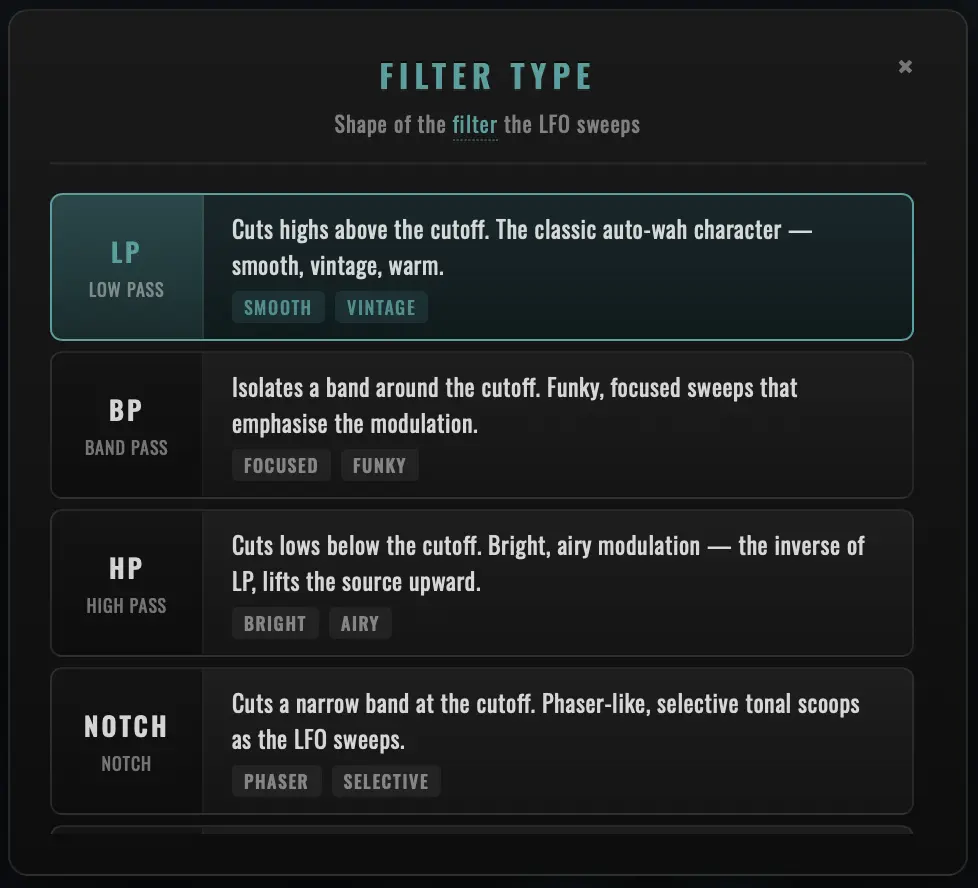
The Type chip in the footer strip selects which output of the state-variable filter is sent downstream. The original 1974 Maestro FSH-1 had Lowpass only — Bandpass, Highpass, Notch and Peak are Niviem creative additions for production versatility. All five types share the same Range / Resonance / Depth modulation; only the spectral shape of the output differs.
Filter Type changes are bridged by a single-block step crossfade — the old type's output fades into the new type's output across one host buffer, sample-aligned, click-free even on hot signals.
Lowpass (LP)
Authentic. The only output the original hardware exposed.
Frequency response: passes everything below the cutoff with full amplitude, attenuates everything above the cutoff at 12 dB/octave. The resonance peak (Q-controlled) sits at the cutoff itself.
Character: warm, removes high frequencies, vocal "ahh" sound at high Q.
| Best for | Settings |
|---|---|
| The canonical 1974 FSH-1 funk-wah | Range 700 Hz, Q 3.5, Speed 2 Hz, Filter mode |
| Bass guitar movement | Range 200 Hz, Q 2.5, Speed 1 Hz, Filter mode, parallel Mix |
| Slow ambient sweeps | Range 500 Hz, Q 2, Speed 0.3 Hz, Filter mode |
| Mu-Tron auto-wah on guitar | Range 600 Hz, Q 3, Sense 6×, Attack 1.5 ms, Envelope |
Tip: Lowpass is the most musical filter type for melodic instruments — it never thins out the source the way Highpass does. If you're not sure which type to use, start here.
Bandpass (BP)
Niviem addition (modern only). Passes a narrow band around the cutoff and rejects everything outside. The slope is 6 dB/octave each side at low Q, steepening with Q.
Frequency response: peaks at the cutoff frequency, attenuates progressively as you move away from cutoff in either direction. Width of the passband is inversely proportional to Q (high Q = narrow passband, low Q = broad passband).
Character: vocal, nasal, focused mid-peak. Classic "wah pedal" voice.
| Best for | Settings |
|---|---|
| Hands-free wah-pedal voice on guitar leads | Range 1 kHz, Q 4, Speed 1.5 Hz, Filter mode |
| DnB wobble bass | Range 400 Hz, Q 3.5, Sawtooth wave, tempo-synced 1/8 |
| Vocal "talk box" on lead synth | Range 1 kHz, Q 3.5, Sense 7×, Envelope mode |
| Drum-loop animation | Range 800 Hz, Q 2.5, Sense 10×, Attack 0.5 ms, Envelope |
Tip: Bandpass at high Q can drop the overall level significantly — push the Output knob up to 60–70 to compensate without changing the patch character.
Highpass (HP)
Niviem addition. Passes everything above the cutoff, attenuates everything below at 12 dB/octave.
Frequency response: mirror of Lowpass. The resonance peak sits at the cutoff itself.
Character: thin, removes lows, subtle movement on rich material. Highpass is harder to use musically than Lowpass because it can hollow out the source, but it's perfect for transient emphasis and atmospheric texture work.
| Best for | Settings |
|---|---|
| Sharp transient emphasis on percussive material | Range 2 kHz, Q 4, Sense 10×, Attack 0.5 ms, Envelope mode |
| Subliminal stereo enhancement | Range 800 Hz, Q 1, Speed 0.05 Hz, low Depth, parallel Mix |
| Cinematic riser textures | Range 1 kHz, Q 5, slow Speed, Filter mode + Cabinet |
| Removing low-end rumble from filter motion | Range 100 Hz, Q 0.7, fixed (no LFO depth) |
Tip: Highpass + parallel Mix at 30–40 % preserves the original low-end while adding the high-pass-filtered movement on top. Useful when you want filter motion without sacrificing the bass.
Notch
Niviem addition. Removes a narrow band at the cutoff frequency — the inverse of Bandpass. The notch is a phaser-style frequency rejection.
Frequency response: flat everywhere except at the cutoff, where a narrow dip occurs. The dip width depends on Q (high Q = narrow notch, low Q = broad notch).
Character: phaser-like, single-stage frequency notch. Subtle on its own, dramatic when swept slowly.
| Best for | Settings |
|---|---|
| Phaser-style notch sweep on rhythm guitar | Range 1 kHz, Q 2, Speed 0.4 Hz, Triangle wave, parallel Mix 50 % |
| Removing a problematic resonance from a track | Range tuned to the offending frequency, Q 3, Mix 100 %, no LFO depth |
| Slow notch movement under sustained synth pads | Range 600 Hz, Q 1.5, Speed 0.2 Hz, parallel Mix |
Tip: Notch at low depth is one of the most musical filter types for mix-bus enhancement — the notch-position movement adds subliminal motion without obvious filtering. Use parallel Mix at 30–50 % so the dry signal carries through the notch.
Peak
Niviem addition. Boosts the resonant frequency rather than rejecting around it — EQ-like behaviour with a moveable peak.
Frequency response: flat everywhere except at the cutoff, where a peak occurs. Peak height is Q-controlled.
Character: pitched, bell-like, EQ-style. At high Q, Peak filter sweeps read as ringing bell tones rather than spectral filtering.
| Best for | Settings |
|---|---|
| Pitched, bell-like resonant accents on percussion | Range 1.2 kHz, Q 5.5, parallel Mix, Filter mode (the Bell Resonance preset) |
| Boosting a frequency band that varies with the LFO | Range to taste, Q 3, Speed slow, Mix 50 % |
| Adding harmonic emphasis to specific notes | Range tuned to the desired note, Q 4, fixed (no LFO depth) |
| EQ-style "presence" boost with movement | Range 3 kHz, Q 2, Speed 0.5 Hz, parallel Mix 40 % |
Tip: Peak at high Q + slow LFO + parallel Mix can sound like a vocal formant moving across a track. The dry signal carries the source, the Peak filter adds a moveable harmonic emphasis on top.
LFO Waveforms
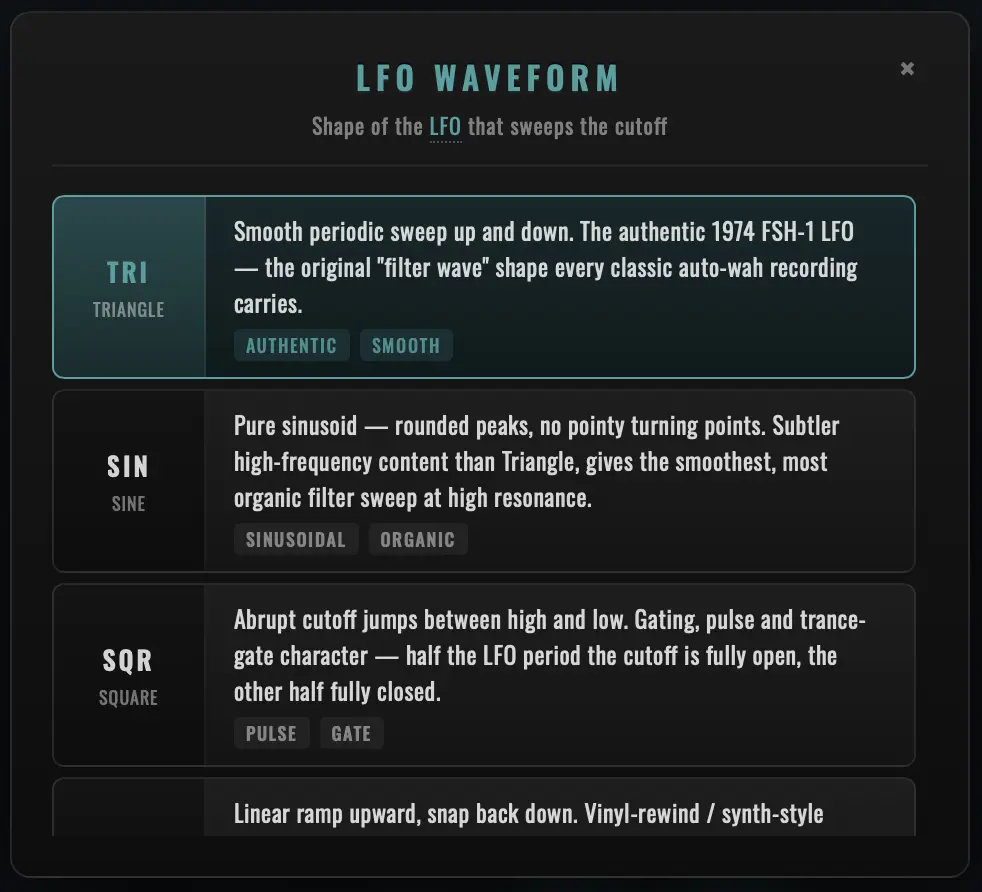
The Wave chip selects the shape of the LFO that drives the filter cutoff in Filter mode only. Sample-Hold mode uses the LFO purely as a clock — the waveform shape is irrelevant, only the rising edges matter — and Envelope mode ignores the LFO entirely. The chip greys out in those modes.
The original 1974 Maestro FSH-1 generated a single triangle waveform from its LM741 op-amp integrator. Triangle is the authentic default; the other four shapes are Niviem creative additions for users who want a different motion under the same Range / Speed / Depth controls.
LFO Waveform changes are bridged by a single-block step crossfade — same machinery as Mode and Filter Type changes.
Triangle
Authentic. The 1974 voice.
Shape: symmetric up-and-down ramp. Constant velocity through the cutoff range — equal time spent at every frequency in the sweep.
Character: smooth, musical, balanced. The default for most patches. Tracks tightly to the LFO clock without character of its own — the filter and resonance do the work, the LFO just provides clean motion.
Best for: anything that wants the canonical FSH-1 voice. The default for funk, ambient, classic auto-wah.
Sine
Niviem addition. Smoother corners than Triangle.
Shape: cosine wave. The cutoff slows as it approaches the top and bottom of the sweep, accelerates through the middle.
Character: more rounded, vocal sweep. The slowing-at-extremes gives a "breathing" quality that Triangle's sharp reversals don't have. Useful when you want the LFO motion to feel organic rather than mechanical.
Best for: pad and vocal material where the LFO motion should feel "humanised" — slower at peaks, faster through transitions.
Square
Niviem addition. Hard alternation.
Shape: instantaneous jumps between the high and low extreme of the sweep. Edge-softening prevents clicks at the transitions, but the sweep is otherwise static for half a cycle, then the other half.
Character: rhythmic, gating, stutter-like. The filter sits at the high cutoff for half the cycle, then jumps to the low cutoff for the other half. Tempo-synced Square at 1/8 reads as a chopped, gated pulsing on sustained material.
Best for: staccato stutter effects on sustained chords, rhythmic gating, electronic / dance production.
Sawtooth
Niviem addition. Asymmetric ramp.
Shape: slow rise, instant drop back to zero (or the inverse, depending on phase). The cutoff rises smoothly through the range, then resets abruptly.
Character: the "falling" auto-wah voice in synth music. DnB wobble bass. The asymmetric reset gives a different rhythmic feel than the symmetric Triangle.
Best for: DnB wobble bass (Bandpass + Sawtooth + tempo-synced 1/8), synth riser effects, any production where you want a directional "ramp-up" feel rather than a symmetric sweep.
Random
Niviem addition. Stepped uniform samples.
Shape: holds a random value (XORshift PRNG, equally likely anywhere in the modulation range) for a full LFO cycle, then steps to a new random value at the next cycle. Slow-evolving random sequence — not the per-sample randomness of true Sample/Hold.
Character: organic, wandering, never-quite-the-same-twice. Each cycle settles on a random cutoff position; the filter then sweeps around that position via the underlying LFO logic. Repeated playthroughs of the same patch produce different filter motion patterns.
Best for: organic-sounding modulation on pads, "alive" patches where you want subtle unpredictability, sound-design textures.
Difference from Sample-Hold mode:
- Random LFO Waveform (Filter mode): one new value per LFO cycle — the value lasts a full cycle.
- Sample-Hold mode: one new value per LFO rising edge, sampled from a Gaussian distribution rather than uniform — bubbling, percussive, period-stuttering.
The two modes are related but audibly distinct. Random gives slow-wandering character; Sample-Hold gives rapid percussion.
DAW Tempo Sync
The Sync chip in the footer strip locks the LFO rate to the host DAW's tempo at a chosen note division. This is a Niviem creative addition — the original 1974 hardware had no DAW to sync to — but it's one of the most useful additions for modern production where the filter motion needs to lock to the song's groove.
How It Works
The plugin reads the host's playhead position every audio block. If the host reports a current tempo (BPM) and Sync is engaged, the LFO frequency is recomputed as:
frequency_hz = bpm / 60 / beat_multiplier
For example, at 120 BPM with 1/4 note division: 120 / 60 / 1.0 = 2.0 Hz. At 90 BPM with 1/2 note division: 90 / 60 / 2.0 = 0.75 Hz. At 140 BPM with 1/16 note division: 140 / 60 / 0.25 = 9.33 Hz.
The BPM is clamped internally to 20–300 BPM for stability — extreme tempos outside this range fall back to the unsynced Speed knob value. This protects against malformed tempo data from misbehaving hosts.
Note Divisions
| Division | Beat Multiplier | At 120 BPM | At 90 BPM | At 140 BPM | Character |
|---|---|---|---|---|---|
| Off | (Speed knob) | (knob) | (knob) | (knob) | Free-running. The Speed knob controls rate in Hz. |
| 4 Bars | 16 | 0.125 Hz | 0.094 Hz | 0.146 Hz | One sweep per 4 bars. Cinematic, build-up scale. |
| 2 Bars | 8 | 0.25 Hz | 0.188 Hz | 0.292 Hz | One sweep per 2 bars. Slow, dramatic. |
| 1 Bar | 4 | 0.5 Hz | 0.375 Hz | 0.583 Hz | One sweep per bar. Familiar bar-length pulsing. |
| 1/2 | 2 | 1.0 Hz | 0.75 Hz | 1.17 Hz | Two sweeps per bar. Half-note motion — pad / sustained. |
| 1/4 | 1 | 2.0 Hz | 1.5 Hz | 2.33 Hz | Quarter-note pocket. Auto-wah-on-the-beat sweet spot. |
| 1/8 | 0.5 | 4.0 Hz | 3.0 Hz | 4.67 Hz | Eighth notes. Driving, energetic — funk-wah staple. |
| 1/16 | 0.25 | 8.0 Hz | 6.0 Hz | 9.33 Hz | Sixteenth notes. Stuttering, bubbly — Sample-Hold territory. |
Mode Interactions
| Mode | Sync Behaviour |
|---|---|
| Filter | Sync drives the LFO frequency. The Speed knob locks (greyed out + ↻ italic readout glyph) when any non-Off division is selected. |
| Sample-Hold | Sync drives the clock rate — new values are sampled at every grid position. Same Speed-knob lock behaviour. |
| Envelope | Sync has no effect. There's no clock to lock to (the cutoff is driven by input dynamics, not an LFO). The Sync chip greys out. Speed always controls release time in Envelope. |
Why the Speed Knob Locks
When Sync is engaged, the LFO rate is determined by the host BPM × division — the Speed knob's value would be ignored. To prevent the user from dialling a Speed value that has no audible effect (and then being confused why nothing changes), the knob is visibly disabled: 35 % opacity, desaturated colour, not-allowed cursor, drag is fully disabled, and the value readout adds a ↻ sync-prefix glyph rendered in italic so the displayed Hz reads as "this is from the host clock, not your knob".
The lock is per-mode: switching to Envelope releases the lock automatically (Speed becomes the release-time control there). Setting Sync = Off, or right-clicking the Sync chip → Reset, releases the lock in Filter / Sample-Hold modes.
Tempo-Sync Tips
- Tempo automation in the DAW is followed: if the host's BPM changes mid-arrangement (tempo automation, ritardando, accelerando), the plugin's LFO frequency tracks it block-by-block.
- Use 1/8 + Sample-Hold for vocoded vocal chops: drop the FSH-1 on a vocal stem, set Mode = S/H, Sync = 1/8, Q = 5. Each eighth-note grid position grabs a new random cutoff — instant stuttered vocoded character.
- Use 1/16 + Filter mode + Sawtooth for DnB wobble: tempo-synced sawtooth at 1/16 + Bandpass + high Q is a wobble-bass voice straight off the bat.
- Half-bar sweeps for build-ups: Sync = 1/2 with high Depth gives a half-bar rising / falling sweep that lines up with most pop / rock arrangements.
- The "Bar Wobble" preset demonstrates a sawtooth LFO synced to half bars — the rising tone line up with bar transitions, useful for cinematic build-ups.
Quality Oversampling
The Quality chip in the footer strip selects the depth of FIR halfband oversampling applied around the OTA saturation stage. Higher Quality runs the SVF at a higher internal sample rate, so saturation harmonics live well above Nyquist where the downsampling halfband cleanly removes them — preventing aliasing artefacts that would otherwise fold back into the audible band.
The Four Quality Levels
| Quality | Internal Rate | Halfband Stages | CPU vs Standard | Latency Contribution |
|---|---|---|---|---|
| Off | 1× (host rate) | 0 | ~50% | None inherent (see "Constant latency" below) |
| Eco | 2× | 1 | ~75% | ~1 sample (one halfband stage) |
| Standard (default) | 4× | 2 | 100% (baseline) | ~2 samples |
| High | 8× | 3 | ~200% | ~3 samples |
The choice array is FROZEN — the integer index is stored in saved presets and DAW state, so future builds cannot reorder the choices without breaking patches. The default Standard / 4× matches the depth UAD and FabFilter ship with on premium emulations, and is the recommended setting for any modern session.
Constant Reported Latency
The plugin reports a constant latency to the host equal to the deepest Quality's group delay (~3 samples at 8× / High). All four paths internally pad their output by maxLatency - oversamplerLatency so the actual emit time is identical regardless of which Quality is active. This is what makes the plugin's host plugin-delay-compensation (PDC) graph stable across Quality changes — the host doesn't need to rewire the PDC every time the user A/Bs settings.
The trade-off is that Off does not run at zero added latency — it inherits the same shared delay so all four paths emit at the same wall-clock time. At 48 kHz the constant latency works out to ~3 samples / 0.06 ms — sub-perceptual for live monitoring and well within any modern DAW's tolerance.
The Two-Phase Crossfade
A Quality switch during playback is never a hard sample-flip. The plugin pre-allocates four independent oversampler paths in prepareToPlay, so the switch is a lock-free atomic index operation — no allocation, no make_unique, no audio-thread blocking.
The crossfade itself is two-phase:
Phase 1 — Pad fill (≈ one host block):
   Active path  ─────────────────────►  Listener

   Pending path ─────────────────────►  ⨯ ignored
                ▲
                └── filling latency pad with current audio
The pending path is run in lockstep with the active path; its FIR halfband cascade fills with current audio. The listener still hears 100 % of the active path, so this phase is silent. After Phase 1 the pending path's pad is fully primed.
Phase 2 — Equal-power blend (≈ one host block):
   Active path  ─────cos(t·π/2)──┐
                                  ├──►  Listener
   Pending path ─────sin(t·π/2)──┘
Both paths now contribute time-aligned audio. An equal-power cos / sin ramp delivers a sample-aligned, phase-perfect transition.
Total Quality switch ≈ 2 × host buffer (≈ 5–10 ms at 48 kHz / 256-sample buffer). Silent in every Mix / Cabinet / Mode / Filter Type combination.
State Migration
At the moment the crossfade begins, every DSP component on the pending path inherits the active path's running state via copyStateFrom:
- State-variable filter integrators (
ic1eq_,ic2eq_) — capacitor charge values, rate-independent in TPT - LFO phase + smoothed rate — so the LFO continues phase-continuous across the swap
- Envelope follower state — peak value, attack / release smoother
- Sample/Hold state — held value + PRNG seed (so the same random sequence continues)
- Cabinet — rotor phase, doppler buffer, BP / LP histories, AM smoother, mic placement smoothers
Both paths therefore enter the equal-power blend in the same DSP state, only at different internal sample rates. The blend is between two slightly-differently-aliased versions of the same signal — the inaudible regime.
CPU and Latency Tips
- Stack instances at Standard or Eco: the FIR cascade is the main CPU consumer. If you're running 10+ instances on a session, Eco / Standard saves enough CPU to scale to 50+ instances on a modern Mac / PC.
- Reserve High for the lead voice: any single instance at High costs the same as 2× at Standard. On the master bus or the lead voice, the alias rejection above 22 kHz is worth it; on side-chain duties, it isn't.
- Off is fine for tracking / monitoring: the saturation stage's alias residue is masked at low Mix levels (where the dry signal carries most of the energy) and is below the 24-bit DAC noise floor at typical recording levels.
- Quality changes are safe at any moment: switch during playback, during automation, during muting — the dual-path crossfade handles every case. There is no "playback restart needed" caveat.
Cabinet & Leslie 122 Emulation
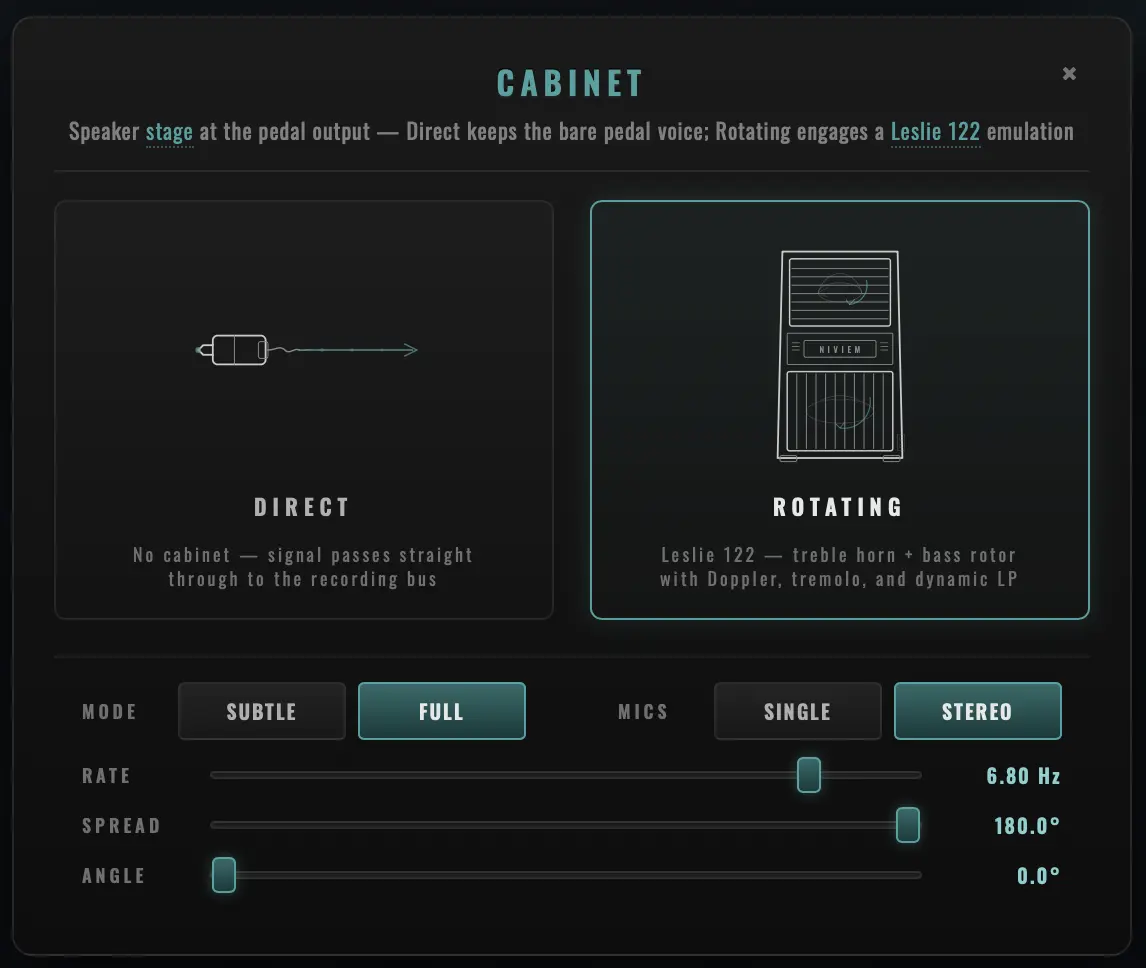
The Cabinet stage runs after the wet/dry mix and before the Output trim. Direct mode bypasses the cabinet entirely (bit-identical to the bare 1974 pedal output, zero CPU). Rotating mode engages a Leslie 122 rotating-speaker emulation ported from the Klang 8008 ROVER post-processor, with two flavours and a continuous 2-mic stereo placement.
The Original Leslie 122
The Leslie 122 is the most-recorded rotating-speaker cabinet in history. Don Leslie patented the rotating-speaker concept in 1941, frustrated that his Hammond organ at home didn't sound like the pipe organs he'd grown up with. Mounting the speakers in a rotating drum mimicked the way pipe-organ sound diffuses through a cathedral.
Inside the original 122:
| Component | Role |
|---|---|
| Amplifier | 40-watt all-tube push-pull (6550 output tubes). Adds its own warmth before the speakers rotate. |
| Treble horn | A sealed wooden horn in the upper baffle, rotating at one of two mechanical speeds. |
| Bass drum | A 15-inch speaker firing into a rotating wooden drum with a single port; the drum's rotation directs bass output around the room. |
| Two motors | Slow-speed motor (Chorale, ~0.8 Hz) + fast-speed motor (Tremolo, ~6.8 Hz), both running continuously; a foot switch selects which motor's belt engages with the rotor. |
| Speed change | The foot switch ramps between speeds via motor inertia, taking 1–3 seconds to settle. The famous "swirl-up" sound IS this ramp. |
The NIVIEM Cabinet stage models specifically the treble horn at the user-selectable rotor rate (default 6.8 Hz, the canonical Tremolo / fast-horn speed). The bass drum's slower rotation is omitted in this build — on guitar / instrument-range material the horn does the audible work, and the drum's rotation is mostly felt as low-mid wobble that adds little to a filter pedal's already-modulated voice. Bass drum rotation is on the v1.1 roadmap.
The Four DSP Stages
Both Subtle and Full Cabinet modes share the same four-stage topology, applied per-channel:
Wet/Dry mix ─► Bandpass EQ ─► AM Tremolo ─► Dynamic LP ─► Doppler ─► Output
                  ▲              ▲              ▲           ▲
                  │              │              │           │
                  +1.5 kHz peak  Subtle: 35 %   Subtle:    Full only
                  +2 dB Q 1.5    Full: 65 %     5–20 kHz   ±0.44 ms
                                                Full:      base 1.0 ms
                                                1.5–20 kHz
| Stage | What it does |
|---|---|
| Bandpass EQ | Peaking EQ centred at 1.5 kHz, +2 dB at Q 1.5. Mimics the natural emphasis the wooden horn baffle adds in the original cabinet's mid-band. |
| AM Tremolo | Amplitude modulation at the rotor rate. Subtle = 35 % depth; Full = 65 % depth. Drives the level pumping that's the Leslie's most obvious sonic signature. |
| Dynamic LP | Frequency-modulated low-pass filter. As the horn rotates "away from" the (virtual) microphone, high frequencies attenuate; rotating back toward the mic restores them. Subtle = one-pole 5–20 kHz sweep; Full = two-pole 1.5–20 kHz sweep (much more dramatic high-frequency cycling). |
| Doppler | Modulated delay line — only present in Full mode. Base delay 1.0 ms, modulation depth ±0.44 ms (simulating a ~15 cm horn radius rotating at the rotor rate). Cubic-Hermite 4-point interpolation gives sub-sample delay accuracy. The Doppler effect adds the iconic Leslie pitch wobble that Subtle mode deliberately omits. |
Cabinet Modes
| Mode | Bandpass | AM Depth | Dynamic LP | Doppler | Character |
|---|---|---|---|---|---|
| Direct | bypass | bypass | bypass | bypass | Cabinet stage entirely skipped. Bit-identical to bare 1974 pedal. Zero CPU. |
| Rotating Subtle | +2 dB | 35 % | One-pole 5–20 kHz sweep | disabled | Gentle 3D spatial enhancement without obvious rotating-speaker artefacts. Useful for mix work where you want added dimension without drama. |
| Rotating Full | +2 dB | 65 % | Two-pole 1.5–20 kHz sweep | enabled | Dramatic rotating speaker emulation. Obvious tremolo + bright/dark cycling + Doppler pitch wobble. The canonical Leslie 122 voice. |
Cabinet Engagement Crossfade
Toggling Direct ↔ Rotating during playback is bridged by a 20 ms equal-power crossfade. The cabinet's filter histories are SNAP-loaded to their target values at the moment of engagement (so the wet path is fully formed from sample 0); the on/off fade then blends two valid signals — never silence-into-audio or audio-into-silence. The crossfade runs sample-by-sample so even on a slow host buffer (1024+ samples) the transition feels smooth.
When the user disengages Cabinet (Rotating → Direct), the cabinet keeps processing for a few extra blocks past the user's "Direct" choice, until the smoother ramps down to zero. This lets the AM / Doppler / LP tail decay naturally into the dry signal instead of being chopped off mid-cycle.
Sub-Controls (Cabinet Modal)
When Rotating is selected, the cabinet modal exposes a sub-strip with five controls:
Mode (Subtle / Full)
The flavour selector. Subtle is mix-bus-friendly; Full is the dramatic Leslie character. Mode changes are smoothed sample-by-sample on every coefficient (Bandpass biquad, AM depth, dynamic LP min/max, two-pole blend) over ~30 ms — Subtle ↔ Full toggles never click even on hot signals.
Mics (Single / Stereo)
Selects between mono modulation and a virtual stereo mic pair.
| Setting | Behaviour |
|---|---|
| Single | One virtual mic in front of the horn. Both output channels carry the same Doppler / AM / dynamic-LP modulation in lockstep — when the level pumps it pumps on both channels together; when the pitch wobbles up it wobbles up on both channels together. Mono modulation pasted onto a stereo bus. |
| Stereo | Two virtual mics around the cabinet. The Spread + Angle controls position them around the rotor axis. The cabinet pre-sums the input to mono before the rotor (the original mechanical signal path: stereo-source → mono summer = the amp → rotor → two mics → L/R output) so the rotor's L/R image is what generates the stereo, not the upstream stereo content. |
A 50 ms equal-power smoother bridges Single ↔ Stereo toggles, so the offset ramps in cleanly rather than snapping mid-rotation.
Rate (rotor speed in Hz)
Range: 0.1 Hz to 10 Hz Default: 6.8 Hz (Leslie 122 fast horn / Tremolo) Skew: Logarithmic
The rotor LFO frequency. Drives the AM depth, dynamic-LP cycling and Doppler delay modulation in lockstep — they're all phase-locked to this single oscillator.
| Range | Character |
|---|---|
| 0.5–1 Hz | Chorale territory — the slow / hymn Leslie character, classic for ballad organ. ~0.8 Hz is the canonical "Slow" foot-switch position. |
| 1–4 Hz | Between the two factory speeds. The Leslie can't actually sit here mechanically (the motor inertia takes 1–3 seconds to settle either Slow or Fast), but a digital cabinet can. |
| 6.8 Hz (default) | Tremolo / fast horn. The canonical Leslie 122 fast speed; this is what most Hammond records used most of the time. |
| 7–10 Hz | Beyond the original — the rotor reads as a fast vibrato. Useful for sound-design, less authentic. |
The rotor runs from its own internal LFO at the Rate this knob sets. It does not sync to the host BPM, it does not follow the filter Speed knob, and it does not phase-lock to the filter LFO — real Leslie motors don't sync to anything either. The two modulation sources (filter LFO and cabinet rotor) drift against each other naturally, which is part of what gives Rotating mode its alive, organic feel.
Spread (mic angular spacing)
Range: 0° to 180° Default: 180° Active: only when Mics = Stereo (greyed out otherwise)
Angular spacing between the two virtual mics around the rotor axis. The 180° default reproduces the "opposite-side mic placement" that matches the original 2-Mic implementation bit-for-bit (the L peak corresponds to the R trough). Lower values bring the pair closer together — at 0° they collapse onto the same rotor position (effectively mono regardless of the Single / Stereo toggle).
| Spread | Character |
|---|---|
| 180° (default) | Opposite-side placement. The canonical engineer trick — mics on opposite sides of the rotor, L peak = R trough. Maximum stereo width, full L↔R rotation movement. |
| 120°–90° | Wide-pair territory. The two mics see overlapping but distinct slices of the rotation. Strong stereo motion without the dramatic peak-vs-trough feel of 180°. |
| 60°–30° | Narrow XY territory. Subtle stereo width; the L and R modulation curves track each other closely with a small phase offset. Useful when the rotation should be felt rather than heard as a hard L↔R sweep. |
| 0° | Coincident — both virtual mics at the same rotor position. The stereo pair collapses to mono modulation. Worth knowing as a sanity check when A/B-ing the rotor character against Single mic. |
Angle (mic pair rotation)
Range: 0° to 360° (wraps modulo 360) Default: 0° Active: only when Mics = Stereo (greyed out otherwise)
Rotates the entire spaced mic pair around the rotor axis. Slides the perceived stereo image around the rotation cycle so the listener experiences the loudest moment of rotation at a different point in the modulation period.
The 0° default keeps the centre of the pair pointing at rotor phase 0 — the original implementation's reference orientation. Angle = 90° rotates the pair a quarter-turn (the L↔R asymmetry inverts at the peaks); Angle = 180° flips the pair to the back side of the cabinet.
Wrap-aware smoothing: the internal smoother takes the shortest path across the 0°/360° boundary, so a drag from 350° to 10° crosses 20° forward through 0° rather than 340° backward through 180°. This matches what the gesture intends — tiny nudge across the boundary, not a full sweep around the cabinet in the opposite direction.
| Angle | Character |
|---|---|
| 0° (default) | Original orientation. Reference point for any A/B against the canonical Leslie sound. |
| ±15° to ±45° | Fine-grained tuning. The stereo image's centre-of-motion shifts subtly so the rotor's peak lands earlier or later in the perceived cycle. Useful when you want the rotation to settle differently against a drum kick or a bass note that's locked to a specific subdivision. |
| ±90° | Quarter-turn. The L↔R asymmetry inverts at the peaks — what was the loudest moment is now the quietest. Dramatic creative-mix territory. |
| 180° | Half-turn, equivalent to flipping the L and R channels. The rotation now reads as the mirror of the default. |
Cabinet Tips
- Default 6.8 Hz Rate is the iconic Leslie sound — leave it there if you're after the classic Hammond-with-Leslie character. Drop to ~0.8 Hz for the slow Chorale foot-switch position.
- Rotating Full + Filter mode + slow Speed is a beautiful combination: the filter LFO and rotor LFO drift against each other, producing constantly evolving spectral / spatial movement.
- Subtle is mix-bus-friendly: 35 % AM is gentle enough to add dimension to a full mix without being conspicuous. Useful for stem-glue work.
- 2-Mic Stereo + 180° Spread is the canonical Leslie recording technique. Try lower Spread values (60°–90°) for a tighter stereo image that still reads as rotational.
- Angle is the most useful when locking a Leslie-rotated pad against a drum loop: small angle tweaks let you drop the rotor's peak on the back-beat or the down-beat without changing the rotor speed itself.
OTA Modelling & Analog Character
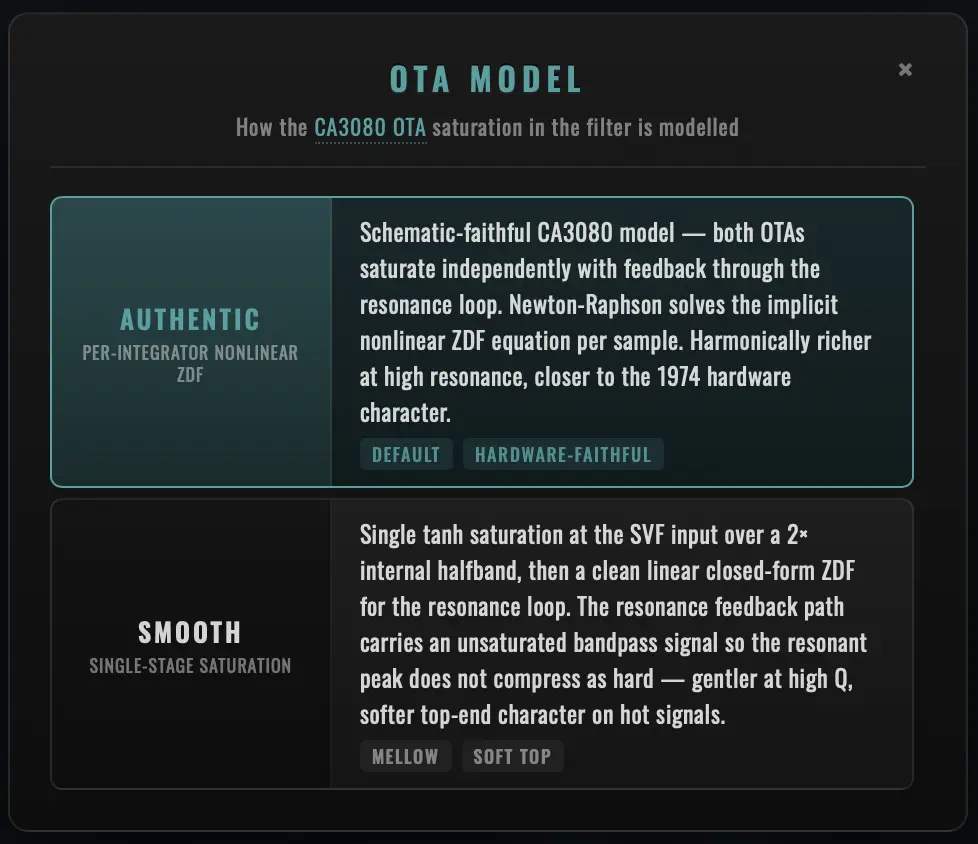
The Oberheim state-variable filter is built around two CA3080 operational transconductance amplifiers (OTAs). The CA3080's input differential pair becomes nonlinear when the input voltage exceeds roughly ±2 · Vt at room temperature (Vt ≈ 26 mV the thermal voltage, so ±52 mV) — at that point the OTA's transconductance soft-clips as a tanh curve before the output current rolls off entirely at higher inputs.
This soft saturation is one of the FSH-1's defining tonal features. NIVIEM FSH-1 models it via the OTA Model selector in the footer, which chooses between two digital implementations: Authentic (schematic-faithful per-integrator NL-ZDF) and Smooth (single-stage tanh + linear resonance loop).
Authentic — Per-Integrator NL-ZDF
The default. Models the per-integrator OTA saturation behaviour directly:
                           Newton-Raphson NL-ZDF
                       ┌──────────────────────────┐
                       │                          │
           input ─────►│  HP solve                │
                       │  └─► tanh(input/Vt) saturated │
           feedback ──►│      ↓                   │──► output
                       │  BP integrator 1 (IC1)   │
                       │  └─► tanh-bounded state  │
                       │      ↓                   │
                       │  LP integrator 2 (IC2)   │
                       │  └─► tanh-bounded state  │
                       └──────────────────────────┘
Both CA3080s saturate independently with their input-stage tanh non-linearity. The resonance loop carries the bounded bandpass output back through the highpass solve, so the two OTA non-linearities stack via the feedback path. The resonant peak in particular compresses harder than a single-stage saturator would suggest. The whole solve is wrapped in a Newton-Raphson zero-delay-feedback iteration to handle the implicit-equation that arises from feeding back a saturated signal into a saturating stage.
A schematic-faithful R4 / R5 input divider maps line-level signals (typical DAW track at -12 dBFS = ~250 mV) to the CA3080's actual saturation knee at ~52 mV — the original hardware had the divider as a fixed input-stage attenuator, the plugin reproduces it as a pre-processing scale. Without this, line-level signals would slam through the soft-clip range too quickly and the saturation wouldn't engage at the same input-level threshold the original hardware engaged at.
Audible character: harmonically rich at high resonance — both OTAs contribute saturation, the resonance peak compresses dynamically with input level, the bandpass output (carried through the feedback loop) is itself saturated. This is what you hear on Frank Zappa's filtered guitar tones.
Smooth — Single-Stage Tanh + Linear ZDF
The lighter-weight alternative. Lumps the multi-stage hardware non-linearity into a single tanh at the SVF input port over a 2× internal halfband oversampler, then runs the resonance loop linearly:
                           Single-stage saturation
                       ┌────────────────────────┐
                       │                        │
           input ─────►│  Halfband 2× upsample  │
                       │  ↓                     │
                       │  tanh saturation       │
                       │  (30 % wet / 70 % dry  │
                       │   blend at saturator)  │
                       │  ↓                     │
                       │  Halfband 2× downsample│
                       │  ↓                     │
                       │  Linear closed-form ZDF │──► output
                       │  (no NL in the loop)    │
                       └────────────────────────┘
The saturator is a 2×-oversampled tanh on the input signal with a 30 % wet / 70 % dry blend at the saturator stage — gentle, distributed waveshaping. The downstream SVF runs the linear asymmetric closed-form ZDF — no nonlinearity in the resonance loop, hence the "smoother" voicing: less harmonic complexity at high Q than the Authentic per-integrator NL-ZDF, and a slightly fatter low-input lift from the saturator's gain-compensation curve.
Output level sits approximately +1.5 dB above the schematic-derived Authentic level (the gain-compensation heuristic on the saturator's wet branch). The audible character is softer on hot signals, more transparent through the resonance peak — closer to the way certain 1970s preamp-and-filter combinations sounded when the OTA was lightly driven rather than slammed.
When to Use Which
| Use Authentic (default) | Use Smooth |
|---|---|
| Reproducing period 1970s recordings | Mixing material that already has its own bite |
| Driving the filter hard (high Q, hot input) | High-Q resonance is overshooting the rest of the mix |
| You want the harmonically rich, schematic-faithful character | You want a tamer top-end — vintage warmth without aggressive saturation |
| The plugin is the lead character of the patch | The plugin is a parallel / send effect that should sit underneath the main signal |
| CPU budget allows the per-integrator Newton-Raphson solve | CPU is tight (Smooth is roughly 30 % cheaper) |
OTA Model Crossfade
Switching between Authentic and Smooth during playback is bridged by a 25 ms equal-power multi-block crossfade. The active path keeps running with the old OTA model; the shadow path runs the new model in parallel; the equal-power blend ramps t from 0 to 1 across ~25 ms (or however many host blocks fit that window). At lower oversampling rates the crossfade extends across multiple host blocks; at High (8×) it can collapse to a single-block step crossfade because the latency pad is shorter.
The OTA chip lights teal when off Authentic — quick visual scan of the chassis tells you whether you're on the schematic-faithful original-hardware path or the Niviem Smooth voicing.
Asymmetric Capacitor Model
The FSH-1's defining quirk is its asymmetric integration capacitor pair — C3 = 1 nF on the bandpass integrator, C5 = 30 nF on the lowpass integrator. The 30:1 ratio is dramatic, and almost every other state-variable filter design uses a symmetric pair (C3 = C5) for simpler maths.
The asymmetric pair gives the FSH-1 its gentle phase taper at high Q — the bandpass and lowpass paths have different time constants, so they peak at the same cutoff but reach that peak via different routes. Normal SVFs have a sharper, more clinical resonance profile; the FSH-1's resonance has a vocal, slightly "wandering" quality.
The plugin preserves this exactly via the TPT discretisation:
g₁ = g · √30   (bandpass integrator, scaled UP)
g₂ = g / √30   (lowpass integrator, scaled DOWN)
Where g = tan(π · cutoff / sample_rate) is the standard TPT pre-warp coefficient. The √30 / 1/√30 split preserves the 30:1 capacitor ratio in the digital integrator update equations — the bandpass path has 30× the time-constant of the lowpass path at every cutoff, exactly as the original hardware does.
Frequency-Dependent Q Reduction
The CA3080 OTAs in the original hardware had limited bandwidth — above 1 kHz, the gain-bandwidth product limited how aggressively the resonance peak could reach. The plugin reproduces this: above 1 kHz the effective Q is gradually reduced, holding at ~60 % of the requested Q above 4 kHz.
The reduction is a smooth piecewise-linear interpolation between two break points (kQReductionStartHz = 1000 Hz and kQReductionEndHz = 4000 Hz), so there's no audible discontinuity at the transition. The behaviour is identical between Authentic and Smooth OTA models — both are subject to the same OTA-bandwidth physics.
Without this Q reduction, the digital filter would resonate too aggressively at high frequencies compared to the original hardware. With it, the FSH-1 plugin matches the OTA bandwidth limitation exactly — the resonance peak sounds "right" at every cutoff position, just like the 1974 hardware.
Coefficient Caching
The TPT pre-warp g = tan(π · cutoff / sample_rate) is evaluated only when the cutoff changes by more than a 1 Hz JND (just-noticeable-difference) threshold. On a smooth LFO sweep across the 80 Hz – 3 kHz range, this cuts tan() calls by ~95 % — the cache misses cluster around the LFO direction reversals where the cutoff is moving slowly through 1 Hz steps, while the fast-moving middle portions of the sweep recompute almost no coefficients at all.
The 1 Hz threshold is below the human ear's absolute frequency resolution at any cutoff in the FSH-1's range (the JND for pitch is 1–10 Hz depending on frequency and listening conditions; the threshold here is at the floor of that range), so the caching is sub-perceptual. Same caching strategy FabFilter Pro-Q uses on its parametric EQ.
The cache is invalidated when the OTA Model changes (the two models use different pre-warp functions — std::tan for Smooth, fastTan Padé approximation for Authentic), so a model toggle flushes any stale cached coefficients and the next coefficient recompute matches the new model's pre-warp exactly.
Real-Time Safety
Every DSP path in the plugin is real-time-safe:
- No memory allocation in
processBlock— all buffers (oversamplers, scratch buffers, doppler delay lines, latency pads) pre-allocated atprepareToPlay. Quality changes use atomic index swap on pre-allocated paths, nevermake_unique. - No locks or mutexes in the audio thread — parameter updates flow through atomic-relaxed cache loads; APVTS state changes update an off-thread atomic that the audio thread reads without contention.
juce::ScopedNoDenormalsperprocessBlock— flushes denormal numbers to zero so older CPUs / DAZ-disabled FPUs don't spike CPU on near-silent feedback decay.- Per-recursive-smoother denormal flush — every smoother that can decay toward zero (envelope follower, AM smoother, LP coefficient smoother, etc.) has an explicit
if (abs < 1e-30) value = 0guard. Pro Tools and some VST3 wrappers historically reset the FPU control word inside the process callback; this guard is a defence against that. - NaN / Inf protection — every recursive smoother and integrator state is bounded; phase counters use
floor-based wrap that handles any finite input without iterating.
The result is a plugin that holds its CPU budget under every operating condition — no spikes during automation, no dropouts during Quality switches, no glitches when the host messes with FPU mode mid-block.
Factory Presets
NIVIEM FSH-1 ships with 41 professionally designed factory presets organised into six categories that cover every shipping plugin feature: all three modes (Filter, Sample-Hold, Envelope), all five filter types (LP, BP, HP, Notch, Peak), all five LFO waveforms (Triangle, Sine, Square, Sawtooth, Random), every Tempo Sync division, both OTA models (Authentic, Smooth), and every Cabinet variant (Direct, Rotating Subtle, Rotating Full with single + 2-mic stereo).
Calibration
The factory bank is calibrated end-to-end for level consistency. Per-preset Mix sits between 65 % and 95 % rather than a fixed 100 %, so the wet-side filter attenuation does not pull the patch level below the dry signal. Output is dialled in per preset (45–60 in the 0–100 range, 50 = unity) so an A/B walk through the bank stays within roughly 3 dB peak-to-peak on a -12 dBFS reference signal — no preset is conspicuously louder or quieter than its neighbours. This means you can audition the bank quickly without constantly adjusting the host channel fader.
Filter Mode (13 presets)
LFO-driven cutoff sweeps. The first six are classic FSH-1 voices; the rest showcase the alternate LFO waveforms (Sine, Square, Sawtooth) and the alternate filter types (BP, Peak, Notch).
| Preset | Settings | Description |
|---|---|---|
| Classic Auto-Wah | LP, 2 Hz Triangle, Range 800 Hz, Q 3 | Iconic 1970s LP filter sweep — the signature FSH-1 voice. Plug a clavinet or rhythm guitar in and it's done. |
| Slow Evolve | LP, 0.3 Hz Triangle, Range 500 Hz, Q 2 | Gentle 0.3 Hz LP sweep — pads, sustained chords, drone material that benefits from quiet evolution. |
| Fast Sweep | LP, 5 Hz Triangle, Range 850 Hz, Q 3.5 | Energetic 5 Hz LP modulation for synth leads and percussive rhythm parts. |
| Funk Wah | LP, 3 Hz Triangle, Range 700 Hz, Q 4.5 | Tight Q 4.5 LP at the funk-wah pocket — guitar / bass material tracks tightly to the LFO snap. |
| Bass Filter | LP, 1 Hz Triangle, Range 200 Hz, Q 2.5, Mix 70 % | Low-range LP at 200 Hz with parallel mix — bass animation that keeps the fundamental clear. |
| Underwater | LP, 0.5 Hz Triangle, Range 300 Hz, Q 5 | Slow, dark, deep — Q 5 LP at 300 Hz for ambient bass beds and cinematic backing. |
| Sine Tremolo | LP, 6 Hz Sine, shallow depth | Sine-wave LFO at 6 Hz with shallow depth — smooth amplitude-tremolo character through the LP filter. |
| Square Stutter | LP, 4 Hz Square | Square-wave LFO chops the cutoff between two values — staccato stutter on sustained material. |
| Sawtooth Wobble | BP, 2 Hz Sawtooth, deep depth | Sawtooth LFO + bandpass at 2 Hz — DnB-style wobble bass voice straight off the bat. |
| Bell Resonance | Peak, Q 5.5, Range 1.2 kHz, parallel Mix | Peak filter at high Q with parallel mix — pitched, bell-like resonant accents on percussion or pads. |
| Phase Notch | Notch, 0.4 Hz Triangle, parallel Mix | Notch filter swept by a slow Triangle LFO — single-stage phaser-style frequency notch carved out of the source. Parallel mix lets the dry signal carry while the notch dips through. |
| Vocal Wah | BP at 1 kHz, Q 4 | Bandpass at 1 kHz with moderate Q — hands-free "wah" pedal voice for guitar leads. |
| Sub Sweep | LP at 150 Hz, slow LFO | Very deep LP at 150 Hz with slow LFO — sub-bass animation for synth pads and 808 layers. |
Sample/Hold (6 presets)
The signature FSH-1 "bubble" voice. Random voltages sampled at the LFO clock and held until the next trigger.
| Preset | Settings | Description |
|---|---|---|
| Random Bleeps | S/H, 4 Hz, high Q, low Range | Classic stepped-random S/H — Frank Zappa territory. Sustained synth leads turn into vintage computer chatter. |
| Synth Bubbles | S/H, 8 Hz, Q 5.5 | Faster S/H rate with Q 5.5 — bubbly stepped accents on lead synths. |
| Robot Voice | S/H, 6 Hz, BP, high Q | Bandpass + high Q + 6 Hz S/H — formant-shifted vocal-like random filtering. |
| Slow Random | S/H, 1 Hz, moderate Q | 1 Hz S/H with moderate Q — slow, evolving random filter changes for ambient soundbeds. |
| R2D2 Chatter | S/H, 12 Hz, BP, deep 3-octave range | Very fast 12 Hz S/H + bandpass with deep 3-octave range — sci-fi droid chatter. |
| Atmospheric Random | S/H, 0.5 Hz, LP at 400 Hz, parallel Mix | 0.5 Hz S/H + 400 Hz LP with parallel mix — slow, dark, ambient stepped texture. |
Envelope (8 presets)
Niviem creative addition — input dynamics drive the filter cutoff. Mu-Tron III auto-wah territory.
| Preset | Settings | Description |
|---|---|---|
| Mu-Tron Classic | LP, Range 600 Hz, Sense 6×, Attack 1.5 ms | Input dynamics drive the cutoff — gentle Mu-Tron III auto-wah character on rhythm guitar and bass. |
| Funky Bass Env | LP at 250 Hz, Sense 8×, Attack 0.8 ms | Fast 0.8 ms attack + high sensitivity + LP at 250 Hz — pluck-reactive funk bass voice. |
| Vocal Talk Box | BP at 1 kHz, envelope-driven | Bandpass at 1 kHz + envelope-driven cutoff — hands-free talk-box voice on guitar leads. |
| Reactive Wah | LP, Sense 4×, Attack 8 ms | Slow 8 ms attack + lower sensitivity — gentle, musical wah that breathes with the source. |
| Soft Touch | LP, Sense 3×, Attack 15 ms, parallel Mix | 15 ms attack + low sensitivity + parallel mix — very gentle envelope movement on pads or sustained synths. |
| Aggressive Bite | HP, Sense 10×, Attack 0.5 ms | Highpass + 0.5 ms attack + high sensitivity — sharp transient emphasis on percussive material. |
| Synth Pluck | BP, Attack 1 ms | Bandpass + 1 ms attack — pluck-style envelope that emphasises the attack of synth notes. |
| Drum Animator | BP, Sense 10×, Attack 0.5 ms | Bandpass + 0.5 ms attack + high sensitivity — beat-reactive filter on drum loops and percussion buses. |
Tempo Sync (4 presets)
Host-locked rate for rhythmic production.
| Preset | Settings | Description |
|---|---|---|
| Quarter Note Sweep | Filter LP, Sync 1/4 | Filter LP locked to host quarter notes — the LFO sits in the groove without manual tempo tweaking. |
| Eighth Note S/H | Sample-Hold, Sync 1/8 | S/H stepped voltages locked to eighth notes — rhythmic random accents in the host's pocket. |
| Half Bar Wobble | Filter, Sawtooth, Sync 1/2 | Sawtooth LFO synced to half bars — slow rising-tone wobble for build-ups and drops. |
| 16th Note Stutter | Sample-Hold, BP, Sync 1/16 | S/H + bandpass at 1/16 — high-rate rhythmic stutter for vocal chops and percussion fills. |
Cabinet (6 presets)
Leslie 122 rotating-speaker character on top of FSH-1 filter motion.
| Preset | Settings | Description |
|---|---|---|
| Slow Leslie Chorale | Filter LP + Cabinet Subtle, Rotor 0.8 Hz | Slow 0.8 Hz rotor + Subtle cabinet — chorale Leslie character on top of an LP filter sweep. |
| Fast Leslie Tremolo | Filter + Cabinet Full, Rotor 6.8 Hz | 6.8 Hz rotor + Full cabinet — fast horn tremolo voice with doppler pitch shimmer. |
| Rotary Bass | LP at 250 Hz + Cabinet Subtle | Subtle cabinet on a low LP at 250 Hz — adds rotor breath without losing the bass fundamental. |
| Stereo Funk | Funk LP + Cabinet Full + 2-Mic Stereo | Funk-wah LP + Full cabinet + 2-mic stereo offset — wide rotary funk pocket on stereo material. |
| Cathedral Sweep | Filter Sine 0.2 Hz + Cabinet Subtle, slow rotor | 0.2 Hz Sine LFO + Subtle cabinet at slow rotor — vast, churchy, slow ambient evolution. |
| Wide Stereo Filter | Filter LP + Cabinet Subtle + 2-Mic Stereo | Filter LP + Subtle cabinet + 2-mic — adds stereo width and rotor character to mono sources. |
Smooth Tone (4 presets)
Same filter recipes as the Filter section but voiced through the Smooth OTA model — single-stage saturation at the SVF input, linear resonance loop. Softer, more vintage character on hot input levels; the resonant peak passes without the per-integrator compression Authentic applies.
| Preset | Settings | Description |
|---|---|---|
| Vintage Smooth Wah | LP wah + OTA Smooth | Classic LP wah voiced with the Smooth OTA model — softer top-end character than Authentic on hot input levels. |
| Mellow Bass Smooth | LP at 250 Hz + OTA Smooth, parallel Mix | Smooth OTA + low LP at 250 Hz + parallel mix — warm, mellow bass animation without aggressive saturation. |
| Soft Pad Filter | BP + OTA Smooth, slow 0.3 Hz sweep | Smooth OTA + bandpass + slow 0.3 Hz sweep — gentle pad filter with vintage warmth. |
| Warm Synth Filter | Peak filter at 1 kHz + OTA Smooth | Smooth OTA + Peak filter at 1 kHz — pitched resonant accent with the softer Smooth saturation. |
Preset Coverage Matrix
The 41-preset bank exercises every shipping feature at least once:
| Feature | Coverage |
|---|---|
| Modes | Filter (29 presets — Filter / Tempo Sync / Cabinet / Smooth Tone categories), Sample-Hold (8), Envelope (8) |
| Filter Types | LP (24), BP (8), HP (1), Notch (1), Peak (2) |
| LFO Waveforms | Triangle (default for most), Sine (1), Square (1), Sawtooth (2), Random (via S/H category) |
| Tempo Sync | 4 presets exercise 4 of the 7 available divisions (1/16, 1/8, 1/4, 1/2) |
| OTA Model | Authentic (37 presets), Smooth (4 presets — dedicated category) |
| Cabinet | Direct (35), Rotating Subtle (4), Rotating Full (2) |
| 2-Mic Stereo | 2 presets (Stereo Funk, Wide Stereo Filter) |
| Quality | Standard / 4× across all presets (the default sweet spot) |
Auditioning the bank in order is a deliberate tour through the plugin's range — start at Classic Auto-Wah, end at Warm Synth Filter, and you've heard every shipping feature.
Tips & Techniques
These are starting-point recipes for canonical sounds. Each one is a parameter table you can dial in by hand; most are also one of the factory presets (cross-referenced where applicable) so you can load and tweak rather than dial from scratch.
Classic 1970s Funk Auto-Wah
The canonical FSH-1 voice — clavinet, rhythm guitar, Wurlitzer.
| Parameter | Setting |
|---|---|
| Mode | Filter |
| Filter Type | Lowpass |
| Wave | Triangle |
| Range | 700–800 Hz |
| Speed | 1.5–3 Hz |
| Resonance | Q 3.5–4.5 |
| Depth | 2 octaves (default) |
| Mix | 80–100 % |
| OTA Model | Authentic (default) |
Cross-ref: factory preset Funk Wah is calibrated to this recipe.
Mu-Tron-Style Envelope Auto-Wah
Hands-free auto-wah driven by playing dynamics. Mu-Tron III on guitar / bass.
| Parameter | Setting |
|---|---|
| Mode | Envelope |
| Filter Type | Lowpass |
| Range | 600 Hz |
| Sense | 6× (default — Mu-Tron "Drive at twelve") |
| Attack | 1.5 ms (default — Mu-Tron FAST) |
| Speed | 1 Hz (≈ 250 ms release) |
| Resonance | Q 3 |
| Depth | 2.5 octaves |
| Mix | 85 % |
Pro Tip: if your input is hot (-6 dBFS or louder) drop Sense to 3–4×; if it's quiet (-18 dBFS or quieter), push Sense to 8–10× to bring it into the responsive range.
Cross-ref: factory preset Mu-Tron Classic.
Frank Zappa Sample/Hold Bubble
The "Ship Ahoy" / Shut Up 'n Play territory.
| Parameter | Setting |
|---|---|
| Mode | Sample-Hold |
| Filter Type | Lowpass |
| Range | 800 Hz |
| Speed | 4 Hz |
| Resonance | Q 4–5 |
| Depth | 2 octaves |
| Mix | 100 % |
| OTA Model | Authentic |
Cross-ref: factory preset Random Bleeps.
Bass Animation (Parallel)
Adds movement to bass without losing the fundamental.
| Parameter | Setting |
|---|---|
| Mode | Filter |
| Filter Type | Lowpass |
| Range | 200 Hz |
| Speed | 1 Hz |
| Resonance | Q 2.5 |
| Depth | 1.5 oct (less than default — keeps the modulation gentle on bass) |
| Mix | 60–70 % (parallel — preserves dry low end) |
| OTA Model | Smooth (gentler on hot bass signal) |
Cross-ref: factory preset Bass Filter (Authentic) or Mellow Bass Smooth (Smooth).
DnB Wobble Bass (Tempo-Synced)
Sawtooth + bandpass + sync = wobble territory.
| Parameter | Setting |
|---|---|
| Mode | Filter |
| Filter Type | Bandpass |
| Wave | Sawtooth |
| Range | 400 Hz |
| Sync | 1/8 or 1/16 (depending on tempo / desired wobble rate) |
| Resonance | Q 4–5 |
| Depth | 3 octaves (deep wobble range) |
| Mix | 100 % |
| OTA Model | Authentic |
Cross-ref: factory preset Sawtooth Wobble.
Vocoded Vocal Chops (Tempo-Synced S/H)
Drop on a vocal stem for stuttered, computer-vocal character.
| Parameter | Setting |
|---|---|
| Mode | Sample-Hold |
| Filter Type | Bandpass |
| Range | 1 kHz |
| Sync | 1/16 |
| Resonance | Q 5 |
| Depth | 2 octaves |
| Mix | 80 % |
Cross-ref: factory preset 16th Note Stutter.
Hammond + Leslie 122 (Slow Chorale)
The classic ballad-organ Leslie sound on synth pads or organ tracks.
| Parameter | Setting |
|---|---|
| Mode | Filter |
| Filter Type | Lowpass |
| Range | 800 Hz |
| Speed | 0.5 Hz (slow filter motion) |
| Resonance | Q 2 |
| Cabinet | Rotating |
| Cabinet Mode | Subtle |
| Cabinet Rate | 0.8 Hz (Chorale) |
| Mix | 90 % |
Cross-ref: factory preset Slow Leslie Chorale.
Hammond + Leslie 122 (Fast Tremolo + Stereo)
The Hammond-records fast-horn voice with full Doppler pitch wobble.
| Parameter | Setting |
|---|---|
| Mode | Filter |
| Filter Type | Lowpass |
| Range | 800 Hz |
| Speed | 1 Hz |
| Resonance | Q 2.5 |
| Cabinet | Rotating |
| Cabinet Mode | Full |
| Cabinet Mics | Stereo |
| Cabinet Spread | 180° (default — opposite-side mic placement) |
| Cabinet Rate | 6.8 Hz (Tremolo / fast horn) |
| Mix | 100 % |
Pro Tip: automate Cabinet Rate between 0.8 Hz and 6.8 Hz across a few seconds to simulate the Leslie "swirl-up" foot-switch transition. The internal smoother lets you do this manually rather than needing the original cabinet's mechanical inertia.
Cross-ref: factory preset Fast Leslie Tremolo.
Phaser-Style Notch Sweep
Single-stage phaser substitute on rhythm guitar.
| Parameter | Setting |
|---|---|
| Mode | Filter |
| Filter Type | Notch |
| Wave | Triangle |
| Range | 1 kHz |
| Speed | 0.4 Hz (slow phaser sweep rate) |
| Resonance | Q 2 |
| Depth | 2.5 octaves |
| Mix | 50 % (parallel — dry signal carries through the notch) |
Cross-ref: factory preset Phase Notch.
Bell-Like Resonant Accents
Pitched percussion-accent character on drum loops or pads.
| Parameter | Setting |
|---|---|
| Mode | Filter |
| Filter Type | Peak |
| Wave | Triangle |
| Range | 1.2 kHz |
| Speed | 1 Hz |
| Resonance | Q 5.5 |
| Depth | 2 octaves |
| Mix | 50 % (parallel — dry plus pitched bell on top) |
Cross-ref: factory preset Bell Resonance.
Mix-Bus Subtle Enhancement
Adds dimension and movement to a full mix without obvious filtering.
| Parameter | Setting |
|---|---|
| Mode | Filter |
| Filter Type | Lowpass |
| Wave | Triangle |
| Range | 800 Hz |
| Speed | 0.05–0.1 Hz (very slow) |
| Resonance | Q 1 |
| Depth | 0.5–1 octaves (small — keep it subliminal) |
| Mix | 20–30 % (heavy parallel) |
| Cabinet | Subtle (optional — adds gentle stereo width) |
The motion should be felt rather than heard. If you can clearly identify the filter motion when listening to the mix in context, you've gone too far.
Cinematic Riser (Tempo-Synced Sawtooth)
Building tension across multiple bars with a tempo-synced ramp.
| Parameter | Setting |
|---|---|
| Mode | Filter |
| Filter Type | Bandpass or Highpass |
| Wave | Sawtooth |
| Range | 200 Hz (start low — Sawtooth ramps the cutoff up across the cycle) |
| Sync | 2 Bars or 1 Bar (depending on the riser length) |
| Resonance | Q 4 |
| Depth | 4 octaves (maximum — full sweep range) |
| Mix | 100 % |
Cross-ref: factory preset Half Bar Wobble (1/2 division version).
Drum-Loop Reactive Filter
Beat-reactive filter on percussion buses.
| Parameter | Setting |
|---|---|
| Mode | Envelope |
| Filter Type | Bandpass |
| Range | 800–1200 Hz |
| Sense | 8–10× |
| Attack | 0.5 ms (instant response) |
| Speed | 4 Hz (≈ 62 ms release — snappy close between hits) |
| Resonance | Q 3 |
| Depth | 2 octaves |
| Mix | 70 % |
Cross-ref: factory preset Drum Animator.
Sustained Pad Animation
Slow filter motion under sustained synth or string pads.
| Parameter | Setting |
|---|---|
| Mode | Filter |
| Filter Type | Lowpass |
| Wave | Sine (smoother corners than Triangle for sustained material) |
| Range | 600 Hz |
| Speed | 0.1–0.3 Hz |
| Resonance | Q 1.5 |
| Depth | 1.5 octaves |
| Mix | 40–60 % |
| OTA Model | Smooth |
Cross-ref: factory preset Soft Pad Filter.
Automation Techniques
Key parameters worth automating:
| Parameter | Automation Use |
|---|---|
| Mode | Switch between Filter and S/H mid-bar to alternate between sweep and stutter character |
| Speed | Build tension by gradually increasing speed across a chorus |
| Range | Sweep manually as a performance gesture — the most expressive control on the plugin |
| Depth | Shrink to 0.5 oct for verses, grow to 3 oct for choruses — same patch, different intensity |
| Mix | Fade the effect in / out for transitions between dry and processed sections |
| Resonance | Build intensity for choruses, ease back for verses |
| Cabinet | Automate Direct ↔ Rotating to bring the Leslie in for solos, leave it off for verses |
| Cabinet Rate | Automate between 0.8 Hz (Chorale) and 6.8 Hz (Tremolo) for the Leslie swirl-up transition |
| OTA Model | Switch between Authentic and Smooth across sections for tonal contrast |
Pro Tip: every parameter change uses gesture-aware host automation bracketing (begin / end gesture events on every drag), so the host records single discrete edits rather than smears of mid-typing values. The undo system in your DAW gets clean, undoable edits per gesture.
Parallel Processing
Insert NIVIEM FSH-1 on a send / aux track:
- Set Mix to 100 % (full wet on the aux)
- Bus the source track to the aux
- Blend with the dry source using the aux fader
- Run independent EQ / compression / reverb on the wet path
This lets you process the FSH-1 output independently of the dry signal — useful for taming a high-Q resonance with a dynamic EQ, or for adding a bit of plate reverb only on the filter motion.
Parameter Reference
The complete list of user-adjustable APVTS parameters. The APVTS ID is what your DAW's automation lane will display; the human-readable name appears in the plugin's UI.
User-Adjustable Parameters
| Parameter | APVTS ID | Range | Default | Skew | Description |
|---|---|---|---|---|---|
| Bypass | bypass | On / Off | Off | — | Plugin-wide bypass with 25 ms equal-power crossfade |
| Mode | mode | Filter / S/H / Envelope | Filter | — | Modulation source for the cutoff (single-block step crossfade on change) |
| Speed | speed | 0.05–15 Hz | 1.0 Hz | Log | LFO rate (Filter / S/H) or release time (Envelope, via release_ms = 1000/(4×Hz)) |
| Range | range | 80–3000 Hz | 500 Hz | Log | Filter centre frequency |
| Resonance | resonance | Q 0.5–10 | Q 0.707 | Log | Filter Q factor |
| Depth | depth | 0.5–4 oct | 2 oct | Log | Modulation octave width — bipolar in Filter / S/H, unipolar in Envelope |
| Sensitivity | sensitivity | 1×–12× | 6× | Log | Envelope-mode pre-gain (Mu-Tron III "Drive"). Inert in Filter / S/H modes. |
| Attack | attack | 0.5–50 ms | 1.5 ms | Log | Envelope-mode rise time. Inert in Filter / S/H modes. |
| Mix | mix | 0–100 % | 50 % | Lin | Wet/dry equal-power crossfade. 100 % matches original FSH-1 voice. |
| Tempo Sync | tempoSync | Off / 4 Bar / 2 Bar / 1 Bar / 1/2 / 1/4 / 1/8 / 1/16 | Off | — | LFO sync to host BPM. Inert in Envelope mode. |
| Filter Type | filterType | LP / BP / HP / Notch / Peak | LP | — | SVF output selector (single-block step crossfade on change) |
| LFO Waveform | lfoWaveform | Triangle / Sine / Square / Sawtooth / Random | Triangle | — | Filter-mode LFO shape. Inert in S/H and Envelope modes. |
| Quality | quality | Off / Eco / Standard / High | Standard | — | Oversampling depth (1× / 2× / 4× / 8×) — dual-path crossfade on change |
| Cabinet | cabinet | Direct / Subtle / Full | Direct | — | Output stage selector (20 ms equal-power engagement crossfade) |
| Cabinet 2-Mic | cabinet2mic | Single / Stereo | Single | — | Cabinet stereo mic placement |
| Cabinet Rate | cabinetRate | 0.1–10 Hz | 6.8 Hz | Log | Leslie 122 rotor speed (default = canonical fast-horn Tremolo) |
| Cabinet Mic Spacing | cabinetMicSpacing | 0–180° | 180° | Lin | Angular separation between the two virtual mics (Stereo only) |
| Cabinet Mic Angle | cabinetMicAngle | 0–360° (wraps) | 0° | Lin | Pair rotation around the rotor axis (Stereo only) |
| OTA Model | otaModel | Authentic / Smooth | Authentic | — | CA3080 saturation algorithm (25 ms equal-power crossfade) |
| Output | output | 0–100 (square-law gain) | 50 | Lin | Post-mix trim (50 = unity / 0 dB; 100 = +12 dB; 0 = silence) |
Internal Parameters (Fixed)
These are not user-adjustable but documented here for completeness — every value listed is hard-coded in the DSP engine.
| Parameter | Value | Description |
|---|---|---|
| Input DC Blocker | 10 Hz one-pole HPF | Removes any DC offset from upstream chain |
| Output DC Blocker | 10 Hz one-pole HPF | Cleans residual offset from saturation / cabinet AM stages |
| TPT Pre-warp | g = tan(π · cutoff / sample_rate) | Standard Topology-Preserving-Transform discretisation |
| Asymmetric capacitor ratio | 30:1 (g₁ = g · √30, g₂ = g / √30) | Models original C3=1nF / C5=30nF integration cap pair |
| Coefficient cache JND threshold | 1 Hz | Skip tan() recompute when cutoff change is below this — ~95 % CPU saving on smooth sweeps |
| Q reduction start | 1000 Hz | Frequency above which Q starts being reduced (CA3080 bandwidth model) |
| Q reduction end | 4000 Hz | Frequency at which Q reduction reaches its minimum |
| Q reduction floor | 60 % of requested Q | Effective Q above 4 kHz — matches CA3080 bandwidth limit |
| Authentic OTA saturation knee | ~52 mV (input) / ~1.6 V (plugin-domain) | CA3080 input non-linearity threshold = 2 · Vt at room temperature |
| Authentic R4/R5 input divider | 3.3 / 103.3 ≈ 0.0319 | Schematic-faithful pre-attenuator mapping line-level → CA3080 knee |
| Smooth saturator drive | 30 % wet / 70 % dry blend | Single-stage tanh blend ratio at SVF input |
| Smooth saturator oversampling | 2× internal halfband | Anti-aliasing for the Smooth-mode tanh |
| Bypass crossfade | 25 ms equal-power | Linear SmoothedValue blending wet ↔ dry on bypass toggle |
| OTA Model crossfade | 25 ms equal-power (multi-block) | Cross-block ramp on Authentic ↔ Smooth swap |
| Cabinet engagement crossfade | 20 ms equal-power | Direct ↔ Rotating fade on Cabinet selector change |
| Cabinet on/off smoother | 333 Hz one-pole (~3 ms) | Internal cabinet on/off ramp |
| Cabinet param smoother | ~30 ms one-pole | Per-coefficient smoothing on Subtle ↔ Full mode change |
| 2-Mic fade smoother | 50 ms one-pole | Single ↔ Stereo mic toggle ramp; also smooths Spread / Angle changes |
| Step crossfade | Single-block equal-power | Mode / Filter Type / LFO Waveform changes |
| Quality crossfade | Phase 1 (pad fill) + Phase 2 (1-block blend) | Dual-path lock-free atomic swap |
| Sample-Hold slew | ~0.5 ms | JFET-modelled rise time on each held value |
| Cabinet bandpass | 1.5 kHz peak, +2 dB, Q 1.5 | Peaking EQ for both Subtle and Full Cabinet modes |
| Cabinet AM depth | 35 % (Subtle) / 65 % (Full) | Amplitude tremolo modulation depth |
| Cabinet dynamic LP — Subtle | One-pole, 5 kHz min – 20 kHz max | Single-pole sweep with rotor phase |
| Cabinet dynamic LP — Full | Two-pole, 1.5 kHz min – 20 kHz max | Two-pole sweep — much more dramatic high-frequency cycling |
| Cabinet Doppler base delay | 1.0 ms | Centre delay around which the rotor modulates (Full mode only) |
| Cabinet Doppler mod depth | ±0.44 ms | Doppler modulation amplitude — simulates ~15 cm horn radius at 6.8 Hz |
Preset & State Schema
| Schema | Version | Storage |
|---|---|---|
| Preset XML | v3 | ~/Library/Application Support/Niviem/Filter SH/Presets/UserPresets.xml (macOS) |
| DAW state (APVTS) | v1 | Persisted by host inside the session file via getStateInformation |
| State signature hash | FNV-1a 64-bit | Persisted alongside the preset name for rename-aware fallback on session reload |
The schemas are append-only — new fields added in future versions land at the end of the layout, and older readers ignore unknown properties. Files saved by older builds reload bit-identically because the new fields fall back to the original-schema defaults (Cabinet Mic Spacing = 180°, Cabinet Mic Angle = 0° — matching the original 2-Mic placement exactly).
Technical Specifications
Audio
| Specification | Value |
|---|---|
| Sample Rates | 44.1 kHz – 192 kHz |
| Bit Depth | 32-bit float internal processing |
| Channels | Stereo (mono input accepted, mono → stereo bus layout supported) |
| Reported Latency | Constant — equal to the deepest Quality's FIR halfband group delay (~3 samples at 8× = ~0.06 ms at 48 kHz) |
| Plugin Formats | Audio Unit (AU — macOS only), VST3 (macOS & Windows), Standalone (Debug builds only) |
| Bus Layout | Mono-in / mono-out, mono-in / stereo-out, stereo-in / stereo-out |
DSP Engine
| Component | Implementation |
|---|---|
| State-Variable Filter | TPT discretisation with asymmetric integration capacitors (g₁ = g · √30, g₂ = g / √30) per Vadim Zavalishin, The Art of VA Filter Design |
| OTA Saturation — Authentic | Per-integrator Newton-Raphson nonlinear ZDF, both CA3080s saturate independently with feedback through resonance loop. R4/R5 input divider for line-level mapping. |
| OTA Saturation — Smooth | Single tanh at SVF input over 2× internal halfband, linear closed-form ZDF, 30 % wet / 70 % dry saturator blend, +1.5 dB nominal level offset |
| Quality Oversampling | JUCE polyphase IIR halfband filter cascade — 4 pre-allocated paths (1× / 2× / 4× / 8×) |
| LFO Generators | Triangle (LM741-modelled), Sine (cos table-free), Square (edge-softened), Sawtooth, Random (XORshift32 PRNG) — per-instance seeded |
| Avalanche Noise Generator | XORshift32 PRNG → Box-Muller transform → Gaussian distribution. Per-instance seeded via memory address + steady_clock entropy. |
| Envelope Follower | Peak detector → tanh saturation → sqrt perceptual mapping. Attack: exp(-1/(τ·fs)). Release: exp(-1/(τ·fs)) with τ derived from Speed. |
| Cabinet | 4-stage chain: peaking-EQ biquad (1.5 kHz Q 1.5 +2 dB) → AM tremolo → dynamic LP (one-pole Subtle / two-pole Full) → modulated delay (Full only, cubic-Hermite 4-point read) |
| 2-Mic Stereo | Phase-offset rotor LFO with wrap-aware shortest-path smoothing on angular spacing + pair rotation |
| DC Blocking | First-order HPF at 10 Hz, per channel, before SVF and after Output |
| Denormal Prevention | juce::ScopedNoDenormals per processBlock + per-recursive-smoother < 1e-30 flush |
| NaN / Inf Protection | Bounded smoothers + floor-based phase wrap that handles any finite input without iterating |
Timing
| Parameter | Value |
|---|---|
| Bypass crossfade | 25 ms linear SmoothedValue |
| OTA Model crossfade | 25 ms equal-power, multi-block |
| Cabinet engagement crossfade | 20 ms equal-power |
| Cabinet on/off smoother | ~3 ms (333 Hz one-pole) |
| Cabinet AM / LP coefficient smoother | ~30 ms (per-sample one-pole) |
| Cabinet 2-mic fade | 50 ms (one-pole) |
| Step crossfade (Mode / Type / Wave) | Single-block equal-power |
| Quality crossfade | Phase 1 ≈ 1 host block + Phase 2 ≈ 1 host block |
| LFO rate ramp | ~5 ms (smoothed rate) |
| Coefficient cache JND threshold | 1 Hz |
CPU & Memory
| Quality | CPU vs Standard | Memory per instance |
|---|---|---|
| Off (1×) | ~50 % | ~200 KB (no oversampler buffers) |
| Eco (2×) | ~75 % | ~280 KB |
| Standard (4×) | 100 % (baseline) | ~400 KB |
| High (8×) | ~200 % | ~700 KB |
Total memory per plugin instance: ~1–3 MB across all four pre-allocated paths plus shared scratch buffers, embedded font assets, and the WebView UI cache. The bundled Oswald + Barlow Condensed fonts add ~120 KB shared across instances. The Nivipedia content.json is ~80 KB, loaded on first open of the encyclopedia and cached for the editor's lifetime.
Real-Time Safety
| Feature | Status |
|---|---|
| Memory allocation | None in processBlock — all buffers pre-allocated in prepareToPlay |
| Locks / mutexes | None in audio path — atomic-relaxed parameter cache, lock-free dual-path Quality swap |
| Thread safety | Atomic parameters, single audio-thread reader + APVTS-listener writer per parameter |
| Denormal prevention | Active — ScopedNoDenormals + per-smoother flush |
| NaN / Inf protection | Active — bounded smoothers + floor-based phase wrap |
| Buffer size support | 1 sample to 8192+ samples |
| Sample-rate change | Re-prepare via prepareToPlay — no audio-thread allocation at any sample rate |
| Quality change | Lock-free atomic index swap with two-phase crossfade |
Bus Layouts
| Layout | Use Case |
|---|---|
| Mono-in / mono-out | Mono guitar / bass / synth track |
| Mono-in / stereo-out | Mono source through Cabinet 2-Mic Stereo — the cabinet generates the stereo image |
| Stereo-in / stereo-out | Stereo source — the SVF processes both channels independently |
The plugin's isBusesLayoutSupported accepts all three combinations. Mono-in / stereo-out is the most musically expressive bus for the Cabinet stage (because the rotor effect generates the stereo image rather than processing pre-existing stereo content).
Self-Tests (Debug builds only)
In Debug builds, the plugin runs three self-tests at instantiation that verify the implementation is consistent:
| Self-Test | Verifies |
|---|---|
runFastTanSelfTest | Padé [5/4] fastTan approximation stays within 0.01 % of std::tan across the SVF cutoff range |
runEqualPowerCrossfadeSelfTest | 1024-entry equal-power crossfade LUT stays within 5·10⁻⁶ relative deviation from cos / sin libm and within 1·10⁻⁵ of the gOld² + gNew² = 1 invariant |
runSchemaRoundTripSelfTest | Synthetic preset with non-default values for every field round-trips through toValueTree → XML → fromValueTree bit-identically |
Release builds skip these checks for CPU efficiency. They serve as compile-time-enforced regression guards during development — any future code edit that breaks the contract trips an assertion at developer-build startup.
The Science of Filter Sample/Hold
How the State-Variable Filter Works
A state-variable filter (SVF) is a two-integrator analog topology that simultaneously produces three filter outputs from the same input — lowpass, bandpass and highpass — with the resonance peak controlled by feedback around the integrator pair. The Niviem FSH-1 adds two more outputs (notch and peak) by combining the basic three.
The original FSH-1 hardware uses two CA3080 OTAs as the integrators, each with its own integration capacitor (C3 = 1 nF for the bandpass integrator IC1, C5 = 30 nF for the lowpass integrator IC2). The integrator transfer function is:
V_out(s) = (gm / sC) · V_in(s)
where gm is the OTA's transconductance (controlled by the OTA's bias current — which is what Range modulates) and C is the integration capacitor. The two integrators are connected in cascade with global feedback that produces the resonance, and the SVF's transfer functions for LP / BP / HP are read off three different points in the network.
Why Asymmetric Capacitors Matter
Most SVF designs use symmetric integration capacitors (C₁ = C₂) for analytical simplicity. The FSH-1 uses a 30:1 ratio (1 nF and 30 nF) — Tom Oberheim chose this ratio to give the filter a specific phase response that the symmetric design couldn't produce.
The asymmetric pair gives the FSH-1 its gentle phase taper at high Q: the bandpass and lowpass paths have different time constants, so they peak at the same cutoff but reach that peak via different routes. Symmetric SVFs have a sharper, more clinical resonance profile; the FSH-1's resonance has a vocal, slightly "wandering" quality that has been imitated but rarely exactly matched by emulations that don't reproduce the asymmetric cap pair.
The TPT discretisation handles this exactly via the √30 / 1/√30 split on the integrator coefficients — preserving the 30:1 ratio in the digital integrator update equations.
Topology-Preserving Transform (TPT)
Vadim Zavalishin's TPT discretisation method (described in The Art of VA Filter Design) discretises the analog SVF with a key property: the digital topology matches the analog topology exactly. The two analog integrators stay as two integrators in the digital code, the resonance feedback path stays as one loop, and the asymmetric integration capacitor pair survives as two distinct g-multipliers on the integrator inputs.
Compare with a bilinear transform: it would collapse the SVF into a Z-domain biquad whose coefficients are mathematically equivalent for the linear case but lose the topology — so all the hardware character that comes from how the pieces are connected is lost. The TPT approach lets the plugin keep the per-integrator nonlinearity (the Authentic OTA model's tanh saturation on each integrator's state), the asymmetric capacitor ratio, and the resonance feedback loop's exact behaviour.
How the LFO and Sample/Hold Work
In the original FSH-1 hardware, an LM741 op-amp configured as a relaxation oscillator generates a triangle waveform at a frequency set by R28 (the Speed pot) and C6 (the timing capacitor). The triangle drives the OTA bias-current input — which scales the cutoff frequency, because the OTA's transconductance is proportional to its bias current.
In Filter mode the triangle directly modulates the cutoff. In Sample/Hold mode, the triangle becomes a clock: rising edges trigger the JFET sampler to capture a fresh voltage from the avalanche-noise generator, which is then held by a hold capacitor until the next clock edge. The held voltage drives the cutoff via the same OTA bias-current path.
Avalanche Noise
The original FSH-1's noise source is a 2N3904 NPN transistor with its emitter-base junction reverse-biased into avalanche breakdown. In this regime, electrons gain enough energy from the field to ionise other electrons via collision, producing a cascade — a "noise" voltage with a distinctive amplitude distribution.
The amplitude distribution is approximately Gaussian but with heavier tails than a true Gaussian — the kurtosis is about 5 vs the Gaussian's 3. This is what gives the FSH-1's S/H mode its characteristic occasional-extreme-jump character, where most held values cluster around the centre but you sometimes hear a value way off from the mean.
The plugin uses a Box-Muller transform to convert uniform XORshift32 PRNG output into a Gaussian distribution. The Box-Muller pair is computed using a fast log approximation and cos / sin from the standard library; the second value is cached and returned on the next call, halving the per-sample cost.
How the Envelope Follower Works (Mu-Tron III Faithful)
The Envelope mode is modelled on the Mu-Tron III auto-wah, which combined a peak detector with a fixed-attack rectifier and a perceptual mapping. The plugin's signal chain:
- Pre-gain: input multiplied by Sense (1×–12×). 6× = Mu-Tron "Drive at twelve o'clock" — saturates the detector on -12 dBFS material.
- Rectify + tanh: absolute value of the pre-gained signal, soft-clipped through tanh. This is the OTA's own input-stage non-linearity from the original Mu-Tron design.
- Peak detector: one-pole peak hold with attack and release time constants. Attack = the user knob (0.5–50 ms); Release = derived from Speed via
release_ms = 1000 / (4 × Speed_Hz). - Sqrt perceptual mapping: the linear envelope is mapped via
sqrt(env)— perceptually flatter than the linear envelope, matches how human hearing perceives dynamics. This is what makes the auto-wah feel "musical" rather than mechanical. - Cutoff modulation:
cutoff = Range × 2^(Depth × envelope)— unipolar (filter only opens upward, never closes below Range). This is the Mu-Tron convention.
The Connection to Oberheim Synthesisers
The FSH-1's filter is the seed of every Oberheim synthesiser filter that followed it. The state-variable topology with non-self-oscillating Q, the asymmetric capacitor ratio, the gentle phase taper — all show up in the Oberheim SEM (1974), the Two-Voice and Four-Voice (1975), the OB-X (1979), the OB-Xa (1980), and the OB-8 (1983). They are all the same family.
If you like the FSH-1's filter character you'll like every Oberheim synth filter through the mid-eighties. Tom Oberheim's design philosophy was consistent across the whole product line: 12 dB/octave SVF, intentionally non-self-oscillating, with that characteristic vocal Q peak that the asymmetric integration caps produce. The FSH-1 was where it started.
Nivipedia — Built-in Encyclopedia
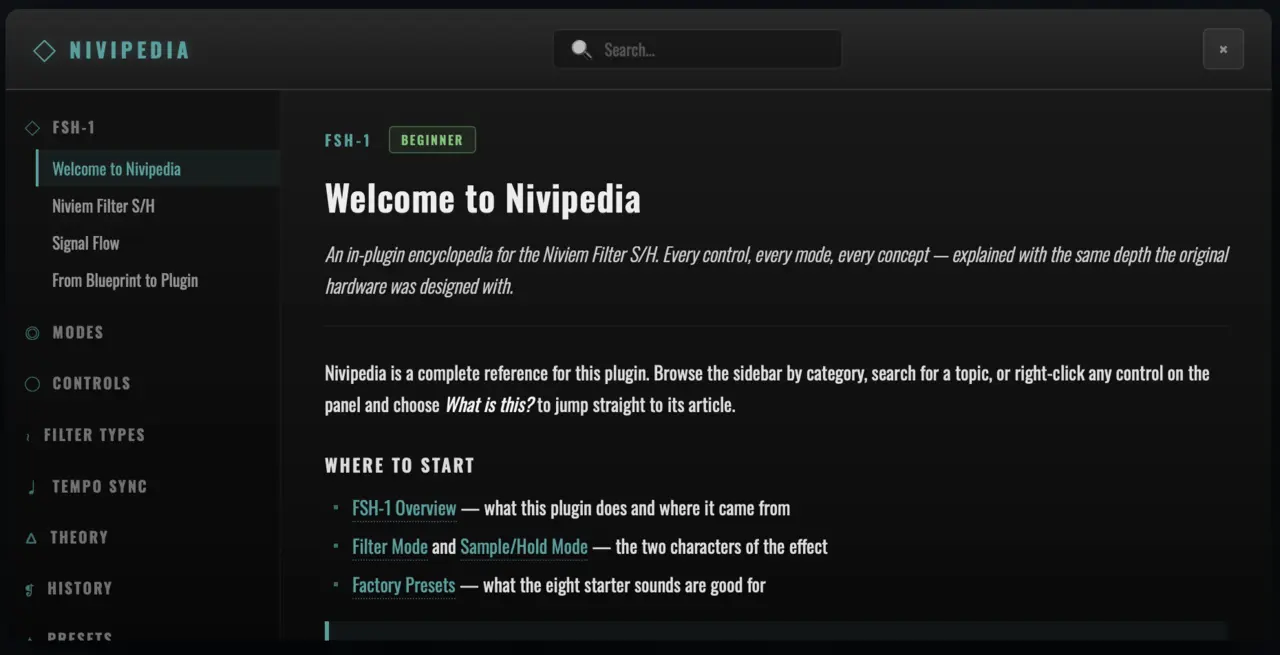
NIVIEM FSH-1 ships with Nivipedia, a 60-entry built-in encyclopedia that documents every control, mode, filter type, theoretical concept and historical reference in the plugin. Click the NIVI button in the top-left corner of the chassis header to open the encyclopedia in a full-screen overlay.
Categories
The 60 entries are organised into 9 sidebar categories:
| Category | Topics |
|---|---|
| FSH-1 | Plugin overview, signal flow, "From Blueprint to Plugin" heritage story, factory presets |
| Modes | Filter mode, Sample/Hold mode, Envelope mode |
| Controls | Range, Resonance, Speed, Depth, Mix, Output, Sensitivity, Attack, Quality, Power |
| Filter Types | Lowpass, Bandpass, Highpass, Notch, Peak |
| Tempo Sync | Tempo Sync overview, Tempo Sync Explained |
| Theory | State-Variable Filter, Oberheim SVF, OTA Model, OTA Bandwidth, LFO Modulation, Sample-and-Hold, Avalanche Noise, Gaussian Noise, TPT discretisation, OTA amplifier, Q Factor, Box-Muller transform, JFET, S/H droop, Halfband Filter, Asymmetric Capacitor Model, Trapezoidal Integration, Frequency Pre-warping, Equal-Power Crossfade, Denormal Numbers, Doppler Effect |
| History | Maestro FSH-1 Hardware (1974), Tom Oberheim, Frank Zappa & The FSH-1, Leslie 122 |
| Presets | Factory Presets reference |
| Workflow | Keyboard Shortcuts, Performance, Cabinet, Cabinet Direct, Cabinet Rotating, Cabinet 2-Mic, Cabinet Mic Spacing, Cabinet Mic Angle, Cabinet Rotor Rate, LFO Waveform |
Every entry has a brief one-line summary and full body text with hyperlinks to related entries. Common cross-references (e.g. "see also: Asymmetric Capacitor Model") appear inline as wiki-links you can click to jump.
Accessing Nivipedia
There are five paths to the encyclopedia:
- NIVI button in the top-left header — opens to the home page with category sidebar
- Right-click any control → "What is this?" — opens directly to the entry that describes that specific control. The link is mode-aware: right-clicking the Mode pill in Envelope state opens the Envelope mode entry, not Filter mode
- Wiki-links inside any modal — every select-modal description (Filter Type, Tempo Sync, Quality, Cabinet, OTA Model) contains inline wiki-links that open Nivipedia at the cited entry
- Search — the search field at the top of the Nivipedia overlay matches entry titles, briefs and bodies. Results highlight the matched terms.
- Sidebar navigation — collapse/expand categories, click an entry to load it
Difficulty Levels
Each Nivipedia entry is tagged with a difficulty indicator (beginner / intermediate / advanced) so you can scan the encyclopedia for material at your level. Beginner entries explain the basics in everyday language; intermediate entries cover practical DSP concepts; advanced entries go into the maths and circuit-level engineering.
What's Inside
Sample of the depth — the Asymmetric Capacitor Model entry (Theory category, advanced) covers:
- Why the FSH-1 uses C3 = 1 nF and C5 = 30 nF rather than the symmetric pair almost every other SVF design uses
- How the 30:1 ratio gives the gentle phase taper at high Q
- The TPT discretisation that preserves it via
g₁ = g · √30,g₂ = g / √30 - The audible difference between asymmetric and symmetric SVFs at the same cutoff and Q
- Cross-references to the Oberheim SVF entry, the Q Factor entry, and the FSH-1 Hardware entry
The complete Nivipedia is offline — once the plugin is installed, no network access is needed to read any entry. Content is bundled inside the plugin binary as content.json (~80 KB).
Preset Management
Loading a Preset
- Click the preset name in the header bar — the preset browser opens beneath the header
- Categories appear as collapsible sections (Filter Mode / Sample-Hold / Envelope / Tempo Sync / Cabinet / Smooth Tone / User Presets)
- Each preset shows its name and a one-line tagline
- Click any preset name to load it — all parameters update immediately with click-free transitions
- Click outside the browser, press Esc, or click the close button to dismiss
Navigating Sequentially
The < > arrow buttons in the header step through the preset bank in order. Wraps at the ends — past the last preset returns to the first. This is the fastest way to A/B between adjacent presets in a category.
You can also use keyboard arrow keys when the preset name in the header has focus.
Saving a User Preset
- Adjust parameters to taste
- Click the + button in the header — the Save dialog opens
- Enter a name (required, up to 33 characters)
- Optionally select a category (defaults to "User") and add a description
- Click Save — the preset is added to the User Presets section of the browser
- The preset is written to disk immediately
User Preset File Location
User presets are stored as a single XML file at:
| Platform | Path |
|---|---|
| macOS | ~/Library/Application Support/NIVIEM/Filter SH/Presets/UserPresets.xml |
| Windows | %APPDATA%\\NIVIEM\\Filter SH\\Presets\\UserPresets.xml |
The file is human-readable XML — you can back it up, share it across machines, or edit it manually if a preset gets stuck on a corrupted value. The plugin re-reads the file on every launch and on every reload, so external edits are picked up without restarting your DAW.
Deleting a User Preset
- Open the preset browser
- Hover over the user preset you want to delete — an × button appears
- Click the × — a confirmation dialog asks if you're sure
- Click Delete — the preset is removed immediately
Factory presets cannot be deleted or overwritten. Saving a preset with the same name as an existing user preset offers to replace it.
Reset User Bank
The preset browser includes a Reset to Factory option that wipes every user preset in one operation. This is the recovery path for a corrupted UserPresets.xml — useful if a preset edit went wrong and the file fails to parse cleanly. Factory presets are never affected; they live in initializeFactoryPresets() inside the plugin binary and are reloaded on every plugin instantiation.
Sharing User Presets
Copy UserPresets.xml between machines to share user presets. The schema is forward-compatible — older builds ignore unknown fields, newer builds fall back to default values for missing fields. A v3-schema preset file (current) loads cleanly on a v2-schema build, just without the cabinet-mic-spacing / cabinet-mic-angle values; conversely a v2 file loads on v3 with those new fields at their defaults (180° / 0° = bit-identical to the original 2-Mic placement).
Session Reload Behaviour
When your DAW saves a session, the plugin's full APVTS state — every parameter value, the loaded preset's name, and a parameter-signature hash — is persisted alongside the session file. On reload:
- The APVTS values are restored, so every knob / chip lands exactly where you left it
- The loaded preset name is restored — the header shows the same preset name
- If the named preset still exists, the preset browser highlights it
- If the named preset no longer exists (you renamed or deleted it between sessions), the parameter-signature hash is searched against every preset in the bank — the closest content match becomes the highlighted preset. Premium-tier sessions therefore survive preset-list edits without dropping the user back to "Default".
Keyboard Shortcuts
| Shortcut | Action |
|---|---|
| ⌘ S / Ctrl S | Open Save Preset dialog |
| Esc | Close any open modal (Save / Preset Browser / Nivipedia / Cabinet) |
| Tab / ⇧ Tab | Cycle keyboard focus between knobs and chips |
| Arrow keys (focused knob) | Step the value (⇧ Shift = coarse, ⌥ Option = fine) |
| Home / End | Jump focused knob to minimum / maximum |
| ⌘ click / Ctrl click | Reset focused control to default |
| Right-click | Open per-control context menu |
Troubleshooting
No Sound Output
- Check that Power is engaged (the button in the bottom-right of the chassis is lit teal)
- Verify Mix is not at 0 % (0 % passes only the dry signal — equivalent to bypass for the wet path)
- Ensure Output is not at 0 % (this is silence — the readout shows
−∞ dB) - Check that the plugin is receiving audio (your DAW's track meter should show input)
- Confirm the host's bus layout — if the plugin is on a stereo bus and your source is mono, the plugin auto-promotes to stereo via the mono → stereo bus support
Filter Motion Not Audible
- Ensure you are not in Power = Off (bypass) — the chassis dims when bypassed
- Verify the Mode pill is set to a mode that does what you expect (Filter for LFO sweep, Sample-Hold for stepped, Envelope for input-driven)
- In Filter mode: increase Speed if it's at the very minimum (0.05 Hz = 20 seconds per cycle, may appear static)
- In Filter / S-H mode: ensure Depth is above 0.5 oct — at minimum the modulation is barely perceptible
- In Envelope mode: check that your input is loud enough to trigger the follower. Watch the Rate LED — if it doesn't flash on transients, increase Sense.
- Ensure Resonance is high enough to make the sweep audible (Q 0.7 = Butterworth flat — the sweep colours are subtle. Q 3+ makes the motion much more obvious.)
- If Tempo Sync is engaged but you don't hear motion: confirm your DAW is providing tempo information (some DAWs only send tempo during playback, not during static editing)
Sound is Too Dark
- Check OTA Model — if set to Smooth, the resonance peak is gentler than Authentic and the high-frequency rolloff is steeper. Try Authentic for a brighter character.
- Reduce Resonance — high Q with Lowpass + low Range can sound oppressive
- Increase Range — if the cutoff sits below 500 Hz, the highs are heavily attenuated
- Check Cabinet — Rotating Full has a two-pole dynamic LP that aggressively rolls off highs as the rotor spins. Try Subtle (one-pole) or Direct.
- Check Mix — at 100 % wet, the dry signal's high frequencies are gone. Pull Mix down to 60–70 % to preserve some dry top end.
Sound is Too Harsh
- Reduce Resonance — high Q + Bandpass / Peak filter types can produce a piercing peak
- Try OTA Model = Smooth — softens the saturation character on hot input
- Check Quality — if at Off (1×), the saturation aliasing can produce harsh artefacts on bright sources. Bump up to Standard or High.
- Reduce Sense in Envelope mode — high Sense pegs the detector and the filter sits at the top of its range
- Check Output — if pushed above 50, the makeup gain may be exaggerating the resonance peak
LFO Not Syncing to Tempo
- Confirm Tempo Sync is set to a non-Off division
- Check that your DAW is sending tempo information — most DAWs only stream tempo during playback. Static editing might show 0 BPM.
- Restart playback to re-sync the LFO phase
- If the host's BPM is outside 20–300 BPM, the plugin clamps internally and falls back to the unsynced Speed knob
Speed Knob Won't Move
This is by design when Tempo Sync is engaged in Filter / Sample-Hold modes — the Speed knob locks (visible grey-out + ↻ italic readout glyph) because the host BPM is overriding it.
To release the lock:
- Set Tempo Sync to Off, OR
- Right-click the Sync chip → Reset to Default (also returns Sync to Off), OR
- Switch to Envelope mode (Sync has no effect there, lock automatically releases)
Plugin Not Appearing in DAW
- Rescan plugins in your DAW (Logic Pro: AU Manager → Reset Validation; Ableton: Preferences → File / Folder → Plugin Sources → Rescan; Cubase: Studio → VST Plug-in Manager → Update)
- Verify the plugin is in the correct folder:
- AU (macOS):
~/Library/Audio/Plug-Ins/Components/Niviem Filter SH.component - VST3 (macOS):
~/Library/Audio/Plug-Ins/VST3/Niviem Filter SH.vst3 - VST3 (Windows):
C:\\Program Files\\Common Files\\VST3\\Niviem Filter SH.vst3
- AU (macOS):
- Restart your DAW after installation
- On macOS, run
auval -v aufx Nfsh Nivmfrom Terminal to verify the AU passes Apple's validation tool
Windows: WebView2 Required
If you see a "WebView2 not found" message:
- Download the Microsoft WebView2 Evergreen Bootstrapper from https://developer.microsoft.com/en-us/microsoft-edge/webview2/
- Install (no user interaction required after launch)
- Restart your DAW
WebView2 is pre-installed on Windows 11. On Windows 10 it's a one-time install.
License Activation
- On first launch, the plugin opens the activation dialog over the chassis. The chassis dims and a "DEMO" badge appears in the header.
- Enter your license key (received from the Niviem dashboard after purchase)
- Click Activate
- If activation succeeds, the badge changes to "ACTIVATED" and the plugin enters full-quality mode immediately
- You can also click Continue as Demo to use the plugin while unlicensed — the audio fades to silence for 5 seconds every 60 seconds of playback (with a 10 ms equal-power fade at every play↔mute boundary so the demo cycle never clicks)
- Click the ACTIVATE button in the header at any time to re-open the activation modal
If activation fails:
- Check your network connection — activation contacts the Niviem dashboard once
- Verify the key was copied without trailing whitespace or line breaks (paste directly from the dashboard email or web portal)
- If you've moved the plugin to a new machine, your previous activation may need to be deactivated from the dashboard first
After successful activation, the JWT is cached locally and verified against an embedded public key on every launch. No network access is required after the first activation — the plugin works fully offline.
High CPU Usage
- Drop Quality from High (8×) to Standard (4×) or Eco (2×) — the FIR halfband cascade is the main CPU consumer
- Set Cabinet to Direct if you're not using rotor effects — Rotating Full + Doppler is the second-largest CPU consumer
- OTA Model = Smooth is roughly 30 % cheaper than Authentic — useful when running many instances
- Close the plugin GUI when not actively editing — the WebView UI consumes some idle resources (the audio thread is unaffected, but the process's overall CPU footprint drops)
- Check for upstream issues — if the host's audio buffer is set very low (32 / 64 samples), the per-block overhead of any plugin compounds. 256 / 512 samples is the recommended buffer size for mixing.
Click on Quality Switch
This was a bug in the very early versions where the demo muter performed a hard cut at cycle boundaries — the click during a Quality switch could coincide with the demo cycle and be perceived as a Quality-related artefact. Both have been fixed. If you hear a click on Quality switch in the current version:
- Confirm you're running the latest plugin version (
v1.0or later) - Try changing Quality slowly (one click at a time) rather than rapidly — the dual-path crossfade takes ~10 ms to settle; rapid clicks during the crossfade window are still smoothed but the cumulative effect can cluster transitions
If the click persists, please report it via support@niviem.net with the host name, sample rate, buffer size and a screen recording of the issue.
Modal Not Opening on First Click
If clicking a chip (Filter Type / Tempo Sync / Quality / Cabinet / OTA) doesn't open the modal on the first try:
- Confirm you're on v1.0 or later — earlier internal builds had a guard timing bug that swallowed clicks within 250 ms of a recent dismiss
- If the modal still doesn't open, click and hold the chip briefly rather than tap-clicking — some hosts intercept rapid clicks for keyboard-modifier handling
Plugin Validation Fails on Logic Pro
Logic Pro runs Apple's auval validation on AU plugins before allowing them in sessions. If the plugin is rejected:
- Run
auval -v aufx Nfsh Nivmfrom Terminal — the verbose output identifies the failure cause - Common causes: missing entitlements (Logic 11 requires hardened-runtime + camera/microphone entitlements for WebView), missing notarisation, blocked by Gatekeeper
- If validation fails on a fresh download, contact support@niviem.net — we will issue a re-signed installer
Credits & References
Development
NIVIEM FSH-1 was developed by Milan Vasiljev / NIVIEM with a commitment to component-accurate vintage effect emulation rooted in primary-source schematic analysis.
Primary Technical References
| Source | Use |
|---|---|
| General Guitar Gadgets schematic (JD Sleep, 2015) | Primary schematic transcription of the Maestro FSH-1 |
| RCA CA3080 datasheet | Transconductance constants, input non-linearity threshold, bandwidth roll-off |
| Vadim Zavalishin — The Art of VA Filter Design (Native Instruments, 2012) | TPT discretisation methodology for the SVF |
| Robert Bristow-Johnson — Audio EQ Cookbook | Peaking-EQ biquad design (used for the Cabinet bandpass pre-emphasis) |
| Tom Oberheim — design history and oral interviews | Oberheim filter design philosophy across the SEM / OB-X / OB-Xa / OB-8 family |
| Mu-Tron III service manual | Envelope follower design — peak-detector + tanh + sqrt mapping |
| Leslie 122 service documentation | Cabinet stage modelling — horn rotation, bass drum, motor inertia, microphone placement |
Special Thanks
To Tom Oberheim (b. 1936) whose visionary work in synthesiser design — beginning with the FSH-1 pedal in 1974 and continuing through the SEM, the OB-X family, and the DMX drum machine — created instruments and effects that continue to inspire musicians, engineers, and sound designers half a century later. The FSH-1 remains one of the most influential filter modulation effects ever conceived.
To the DIY pedal building community (in particular General Guitar Gadgets and the freestompboxes.org forum) for preserving vintage circuit knowledge and making schematic transcriptions freely available to the next generation of engineers.
To Frank Zappa (1940–1993), whose extensive documentation of the FSH-1 / VCF-200 in his recorded work made the pedal's voice and tonal territory legible to anyone listening — the canonical references for what the pedal can sound like in a finished mix.
Version History
Version 1.0 (March 2026)
Initial release.
Authentic emulation of the 1974 Maestro FSH-1 / Oberheim VCF-200:
- TPT-discretised state-variable filter with asymmetric integration capacitors (g₁ = g · √30, g₂ = g / √30) modelling C3 = 1 nF / C5 = 30 nF original pair
- Two CA3080 OTA saturation models — Authentic (per-integrator Newton-Raphson NL-ZDF with R4/R5 schematic input divider) and Smooth (single tanh + linear ZDF over 2× internal halfband)
- Frequency-dependent Q reduction matching CA3080 bandwidth limit (1 kHz–4 kHz, 60 % floor)
- Three operating modes — Filter (LFO-driven), Sample-Hold (avalanche-noise), Envelope (Mu-Tron III faithful)
- Box-Muller Gaussian PRNG for Sample-Hold avalanche-noise distribution; per-instance seeded
- Five filter types (Lowpass authentic + Bandpass / Highpass / Notch / Peak modern additions)
- Five LFO waveforms (Triangle authentic + Sine / Square / Sawtooth / Random)
- Mu-Tron III faithful envelope follower (Sense + Attack + Speed-as-release)
- Leslie 122 cabinet emulation (Direct / Subtle / Full) with continuous 2-Mic Stereo placement (Spread + Angle)
- Quality oversampling (Off / Eco / Standard / High = 1× / 2× / 4× / 8×) with two-phase click-free dual-path crossfade
- Host tempo sync (7 note divisions, 1/16 to 4 Bars)
- 41 factory presets across 6 categories
- Nivipedia — 60-entry built-in encyclopedia with hyperlinked cross-references
- Click-free transitions on every parameter (bypass, mode, filter type, LFO waveform, OTA model, Cabinet engagement, Quality)
- Real-time-safe DSP — no audio-thread allocation, no locks, atomic parameter cache, denormal / NaN / Inf protection
- Premium WebView UI — brushed-metal chassis, milled-aluminium knobs, real-time meters, gesture-aware host automation, full keyboard navigation, ARIA scaffolding for screen-reader accessibility
- License management — Niviem dashboard DRM with Ed25519 JWT verification, offline use after activation
- Demo mode — full plugin functionality with 60 s play / 5 s mute cycle, 10 ms equal-power fade at boundaries
Trademark Notice
NIVIEM FSH-1 is an independent product developed by Milan Vasiljev / NIVIEM. This plugin is an authentic emulation inspired by the Maestro FSH-1 and Oberheim VCF-200 filter sample/hold pedals designed by Tom Oberheim in 1974.
References to Maestro, Oberheim, Norlin, Mu-Tron, Q-Tron, MXR, Lovetone, 3Leaf, Leslie, Hammond, CA3080, LM741, 2N3904, 2N4303 and other historical equipment, components or product names are used solely for the purpose of describing the sound characteristics, technical references, and historical context that inspired this emulation, which is standard practice in the audio software industry.
These names are trademarks of their respective owners. This plugin is not affiliated with, endorsed by, or sponsored by any of these manufacturers or their successors.
The original Maestro FSH-1 schematic (1974) is available in the public domain via builder-community archives. The CA3080 OTA datasheet is published by RCA and its successors. No proprietary intellectual property is reproduced in this plugin — the emulation is based on publicly available schematics, datasheets, and behavioural analysis of the original hardware.
Copyright © 2026 Milan Vasiljev. All Rights Reserved.
NIVIEM is a trademark of Milan Vasiljev.
For support: support@niviem.net
Web: niviem.net